 You don't need to be an 'investor' to invest in Singletrack: 6 days left: 95% of target - Find out more
I have a PC here running directly from the router via an ethernet cable. Everything works fine. No problems at all. All my websites load instantly and without issue.
My Android phone, however, has an issue on wifi that has been getting progressively worse over a period of weeks. It started with a few websites taking a while to load and has progressed now to those same websites not loading at all. The main culprits I use regularly are the BBC homepage, Guardian homepage, Ebay, Strava, and the Singletrack homepage. Other websites, such as other forums I use, Youtube, a German news site etc, are absolutely fine and load quickly and easily. On Mobile data (which I don't have here) there is no problem either with any websites.
I am using Brave browser but have the same issue in Chrome (same architecture, maybe I need to try a different type of browser?). I've tried a lot of things like clearing cache and data, changing DNS and a few other things but it is always the same result.
Would any of the great computer minds of STW have any ideas where my problem lies?
Once in a blue moon I have to completely forget my home WiFi and then it gets back to normal again.
@Caher. Interesting. I have just installed Firefox on the phone. No difference. The same websites won't load while the ones which do work still work. Very frustrating as there is no seeming logic to it. If it was something like a firewall issue then why would it work on the PC with ethernet running off the self same router?
Have you tried a Factory reset on the phone?
Try turning off MAC address randomisation on the phone and then reboot your router.
@scotroutes Won't that loose everything on there? A simple restart doesn't make any difference and I think the same issue occurs on Mrs WF phone too. I'll check tomorrow
Could it be that you’re on the same channel as a nearby router for Wi-Fi.
have you tried splitting the 2.8 and 5g Wi-Fi and see if that makes a difference
Rebooted the router?
router has been rebooted and factory reset a few times. Just tried the MAC randomiser. No difference
Won’t that loose everything on there?
What's on it that's not backed up or synced online? What do you do when you get a new phone?
When your internet speed is only 2 mbs you don't tend to use online backups! (Though that has recently changed and maybe I should relook at this). I just used a phone copy app when I got my last phone. but that was a couple of years ago now.
Data not backed up? At all? 🤦🏻♂️ how long until the inevitable ‘my phone died, how do I get my 5 years of irreplaceable photos and other data’ thread?
On the websites not loading, have you tried a different DNS server? Changing from ISP default to cloudflare, quad9, google, or another of your choice can sometimes make a difference. Has for some folks I've met who’ve complained ‘my Gb internet is terrible, my router is so slow, etc’. Problem wasn’t loading speed, just sluggish site resolution.
You can get free tools to see if there's any other WiFi interfering with your channel. I use netspot
Lots of dead time overnight that would allow you to use online backup.
Photos are all backed up to PC and every few months to an external drive so worst case is a few months photos lost. I'd be more pissed off if I lo9st those 2 or 3 hard copy albums from my youth in a fire than the 50 thousands phone snaps I have on my phone these days!
Anyway. Back tot he issue. One thing I have noticed since clearing cache and data is I cannot now log into any google or facebook account. It starts process OK but when you enter email details it then just hangs. It did it the other night on Facebook too after I reinstalled the app to see if that would help. I had the phone with me down the road and logged in to the wifi at the local village hall and it worked fine then and I was able to complete the log in. The back home I was able to use FB over wifi OK.
Yesterday I could use Youtube OK but since deleting cookie and data I can't get past the SING IN page. Yet all OK via ethernet on the same router?
@5lab I installed NetSpot. Lots of wifi activity to see but my router is the strongest. Tried running the speeedchecker. No luck. Tried some other speedckeckers and they all hang on the initial PING. On the PC with cable connection I get 90 mbs down and 45 up!
I doubt it's a wifi versus hard-wired thing, unless you have conflicts with other networks which it sounds like you have ruled out (I'd still find a clear channel and use that). Are you able to put your PC on wifi and see if the same thing happens? Could be many things but my initial guesses would be DNS, a config issue on your router (presumably you've not changed anything there though?) and/or a possible issue with your ISP and routing/resolution.
First think I would do is try to rule in/out the wifi vs hard-wired question. If you can replicate the issue on your PC there are many more tools available to help you diagnose.
I tried the PC on wifi last night by pulling the ethernet cable. It was the same as the phone. Some websites work, others didn't. Exactly the same ones
Just asked my bro next door and he says he had a similar problem a while back and they now use a VPN which seems to bypass the issue?
Sounds like DNS issues (your laptop may havs cached a load of addresses your phone not) change your routers DNS to a common one Google or OpenDNS etc some android versions you can override DNS setting too. Search web for DNS settings and how to apply to your equipment.
Have you tried a free WiFi analyser app to see if you have neighbouring networks drowning yours out? Often everyone is on the same 4 default channels and changing yours to a free zone might help. Are you connecting to the 2.4 or 5ghz bands? Maybe try turning the 5 off and just go with the slower one, which should be fast enough for typical activities, see if that changes anything
Done all that grimep. changes nothing
Going to try a VPN and see what that does (i'm sceptical)
Does your phone have Android VPN on already?
not that I am aware of
Which version of Android are you on?
I would suspect some kind of either dns thing or maybe even buggy ipv6 support somewhere. IP layer packet capture might show something.
buggy ipv6 support
Yes, this is a weird one, and if you eliminate DNS that would be my next thought.
1st rule of support though, when did it start and what changed before that?
Test your IPv6 connectivity.
For the Help Desk
Summary
Tests Run
Share Results / Contact
Your IPv4 address on the public Internet appears to be 149.5.138.209
No IPv6 address detected [more info]
You appear to be able to browse the IPv4 Internet only. You will not be able to reach IPv6-only sites.
To ensure the best Internet performance and connectivity, ask your ISP about native IPv6. [more info]
Your DNS server (possibly run by your ISP) appears to have IPv6 Internet access.
VPN? Adding an extra variable to an already hard for @welshfarmer to diagnose problem? I'd be inclined to try and diagnose the real problem before introducing more.
I tried the PC on wifi last night by pulling the ethernet cable. It was the same as the phone. Some websites work, others didn’t. Exactly the same ones
Consider repeating this exercise and:
Check the quality of the wifi connection - https://www.securedgenetworks.com/blog/wifi-signal-strength
If the wifi quality is iffy then that may be one source of problems.
If the wifi quality is good enough then try pinging some known sites https://learn.microsoft.com/en-us/windows-server/administration/windows-commands/ping .
3 to 5 pings are usually enough to get a reasonable average in this kind of exercise.
Try pinging your router first using its LAN IP address - should set a good ping benchmark for you to compare subsequent tests with.
Try pinging some sites you know load well on wifi and some you know are pants. Use their URLs and then use their IP addresses (find these using nslookup from the CLI or google them).
If there is a difference between the URL ping and the IP ping then I'd change the DNS server you're using and see if that makes a difference.
The thing that puzzles me is the same thing that seems to be puzzling you @welshfarmer - PC ethernet connection consistently OK, WiFi connection inconsistent overall but consistent in its 'difficult' sites and 'easy' sites. And as you've likely done the usual things of turn it off, count to 10, turn it back on again and compared wired vs wireless this seems troublesome.
Good luck. And reassuring that you have backups.
edit: problems accessing Facebook? Is that perhaps a sign to let it go?
My point about asking for the built in Android VPN is that in my experience it's very slow and buggy.
Pull down top menu and look for symbol, make sure it's off.
When your internet speed is only 2 mbs you don’t tend to use online backups! (Though that has recently changed and maybe I should relook at this)
What's recently changed? New Internet provider? New WiFi boxes? Is the WiFi provided by the same box as the wired connection, or do you have something like mesh?
I'd bring up the network settings on the hardwired PC and do the same on the Android phone and compare everything.
QoS enabled on the router?
Sometimes there are different profiles for wired vs. wireless.
Also, on your computer, open up the console (F12 normally), and switch to the networking tab. Load up a slow website, is it hanging on any particular thing, or is it time to first byte?
Have you had a recent phone update? I had problems with wifi recently after Andoid update on my Samsung phone.
I downloaded Ping monitor app and it was showing up to 50% being lost! I forgot network, reset router and changed some settings after some googling.
If you think that could be the problem I will try to remember what I changed and post later.
The router's ****ed, get your ISP to replace it. If wired works and wireless doesn't then it can't be much else unless it's sat next to a load of running Welsh farmer's machinery, I can't see channel contention being an issue on a farm.
(Even if it's not donald ducked, it can't hurt to replace it anyway.)
Can you go to a WiFi hotspot and test at that location. What happens then?
You may have done this already as a process of elimination but could be any number of factors.
The way that ipv6 dns bugs seem to work is that your DNS server hands out ipv6 addresses instead of ipv4 when available. Sites that are only ipv4 work fine.
A packet capture with something like wireshark will tell you straight away.
Go to fast.com on both devices, check speed and loaded latency. Try WiFi on another device, are the results the same. Could have a virus on your Mobile or a hardware issue.
Are you in the same room as your router / is the aerial plugged in if it has one / are your walls stone, do you have a smart fridge or other device conflicting?
What make / model is your router? Factory reset the router, not the phone.
Have you tried calling your ISP? Again, could be a hardware issue on your router or bad upgrade they have pushed.
Yesterday I could use Youtube OK but since deleting cookie and data I can’t get past the SING IN page.
Maybe it didn't like it, try some classical opera instead?
There are some really weird hail mary suggestions on this thread.
Have you tried a Factory reset on the phone?
That's a pretty nuclear suggestion before trying any other wifi device.
You can get free tools to see if there’s any other WiFi interfering with your channel.
If it was channel interference, everything would suck. It wouldn't be selective about which websites.
VPN? Adding an extra variable to an already hard for @welshfarmer to diagnose problem? I’d be inclined to try and diagnose the real problem before introducing more.
VPN is actually not a bad suggestion to try. Rather than adding a variable, it eliminates one. If it works over VPN, chances are your router is being selective about traffic or it's something to do with your local connection characteristics.
Go to fast.com on both devices, check speed and loaded latency. Try WiFi on another device, are the results the same. Could have a virus on your Mobile or a hardware issue.
Already covered that his computer exhibits the same broken behaviour over wireless but is fine wired.
Hardware issues unlikely to be selective about which websites wouldn't load. Viruses also kinda unlikely to exhibit this behaviour.
Are you in the same room as your router / is the aerial plugged in if it has one / are your walls stone, do you have a smart fridge or other device conflicting?
See channel interference/contention.
I would check if there is a firmware upgrade available for the router and maybe try creating a guest type wireless account with a “fresh” config and try connection via that.
Bugger it. Had a guts full of troubleshooting now. I have just pulled the ethernet cable so the PC is forced to run on wifi and what do you know. All working hunkydory. No problems with any websites (where it was playing up this morning on same one that didn't work on the phones). However, same issue persists on both my Android phones so running out of ideas. FYI the router is in same room as PC and phones, about 2 metres from any of them. Signal strength is perfect.
Maybe tomorrow it will all just go back to normal
Thanks for everyone who has taken time to make suggestions. I appreciate it.
Have you tried a Factory reset on the phone?
That’s a pretty nuclear suggestion before trying any other wifi device.
There is a less-nuclear reset wifi and Bluetooth settings on Android. You'll have to reenter the wifi password and repair any Bluetooth devices. But it's two Android devices with the issue 🤔
The way that ipv6 dns bugs seem to work is that your DNS server hands out ipv6 addresses instead of ipv4 when available. Sites that are only ipv4 work fine.
That's not how dns works.
You do get some broken behaviour with bad ipv6 routing, but as they don't appear to have an ipv6 address, that's unlikely to be the issue.
Well I finally have a workaround though no explanation. I have installed a VPN (Nordvpn) that my nephew uses and the problem has gone away. I couldn't install it when Brave was my default browser and had to do it using Chrome. Once up and running I was able to switch back to the Brave browser I always use and everything now works fine.
Very strange since the PC was working fine on wireless and ethernet (without VPN) but both phones refused to connect to many websites.
What make of phone is it btw?
Sounds like your router is doing some kind of traffic filtering.
Try turning off any QoS or parental controls.
Its a Huawei phone, but my old Nokia that Mrs wf has exactly the same issues. There are no parental controls set anywhere and it doesn't seem possible in the router to change QoS settings
Its a Huawei phone
LOL. I was going to ask specifically if it was that brand, though the old Nokia tends to rule out my idea.
Motors / microwaves / fluorescent tubes / etc etc can all interfere with WiFi. You could try splitting the network into its 2.4 and 5 GHz sub bands.
Motors / microwaves / fluorescent tubes / etc etc can all interfere with WiFi. You could try splitting the network into its 2.4 and 5 GHz sub bands.
That would affect all websites and general loading speed though, electrical interference doesn't discriminate!
Perhaps it's solar flares, have you tried blowing up the sun?
Best suggestion yet!
The wifi itself is strong and only shows the few devices I have running. For context we are in the middle of nowhere, 6 miles from a mobile signal and have been getting our broadband via a microwave radio link transmitted up the valley to my barn and then via a radio link to the house and from the radio link via a little black box and then a WAN cable link to a Nokia Beacon 2 just above my head. The beacon is the wifi router and also has a single LAN cable which is connected to the PC. Wifi connected devices are limited to my phone (Huawei), wifes phone (Nokia) wifi card in PC, Laptop, the TV when it is switched on, and my Victron Cerbo GX controlling all the solar and battery gubbins in the cellar. The system has been running pretty much faultless for the past 8 months and only recently started to play up. I will call the tech support on Monday to see if they have changed anything since nothing my end has been (knowingly) altered.
The fact that running a VPN fixes it may suggest a DNS issue??
I'd say that the fact that the VPN fixed it makes it more likely that it's a DNS issue. Now addresses aren't being resolved locally, but sent down the VPN tunnel and will be resolved by whatever DNS service the VPN provider is using.
Did you ever try changing the DNS address as many people have suggested?
The fact that running a VPN fixes it may suggest a DNS issue??
I mean, maybe. It's certainly possible, but I'd say it's unlikely. DNS probably isn't different on wifi vs. wired, unless you've deliberately set it for a given device. It's also kinda improbable that it would affect some sites but not others.
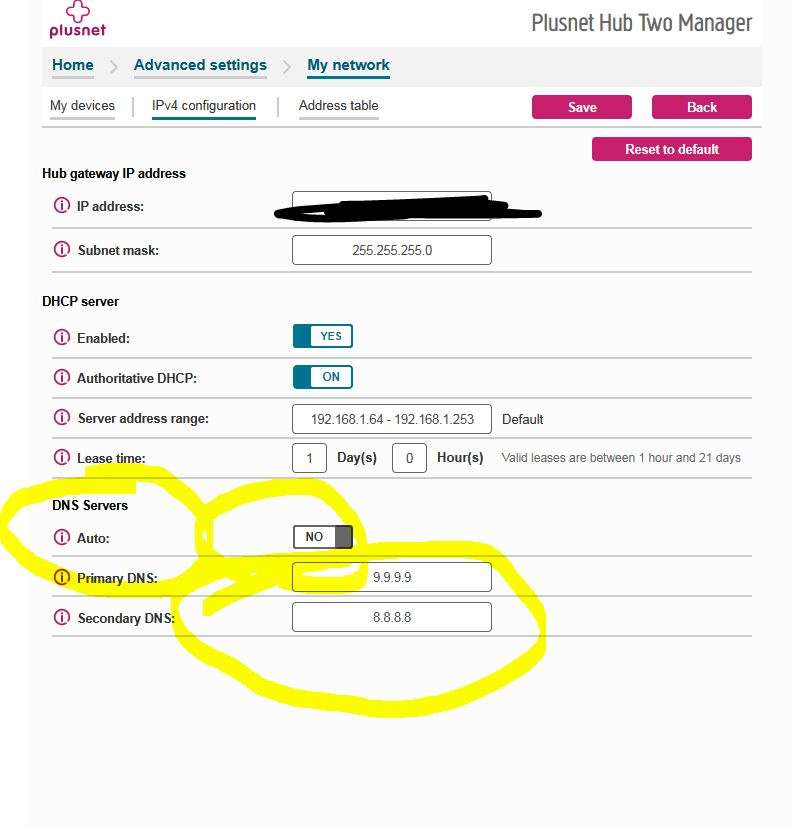
There did not appear to be any way to change the DNS in the router as suggested by Mattyfez above (they were set at 8.8.8.8 & 8.8.4.4)
Can you get anything useful from the Firefox network monitor?
https://firefox-source-docs.mozilla.org/devtools-user/network_monitor/
I tried the PC on wifi last night by pulling the ethernet cable. It was the same as the phone. Some websites work, others didn’t. Exactly the same ones
I have just pulled the ethernet cable so the PC is forced to run on wifi and what do you know. All working hunkydory.
Which is it?
Exactly my thoughts. Last night the PC didn't load the same websites on wifi as the phone. Today it did!
Whatever the issue i I am beginning to think it is a bit illogical and something only my ISP will be able to explain. This is a problem as technically I don't really have a service provider at the moment as the whole system to provide high speed broadband to the valley has been a shambles to be honest. I am just happy that it still works at all. I really really don't want to go back to copper cable and 2 mbs speeds, nor do I wish to put any money into Elon Musks coffers.
I expect that the issue is with your router, given as everything works fine wired. So, I'd be very surprised if your ISP could tell you what's up, unless they've got some very clueful support people.
You could try sharing setting up a wifi hotspot on your computer (keeping your computer connected wired). I would expect that to work the same as your computer.
It might also be worth switching your phone to ipv4 addressing only, but I'd be surprised if that fixed things.
Also also, if your router had a dynamic range of IP addresses it hands out and a separate static range it keeps reserved, you could try manually configuring an IP in the static range, rather than using DHCP.
It might be that your router is ****ed then, if it's a router suppied by your ISP, then as @cougar said... get onto them to send you a new one, they are only 'rental' routers as part of the contract of servce. I.e. they will ask you to send it back if you switch suppliers.
So they should send you a new one if yours develops a fault.
Oh, and although it doesn't feel like DNS to me, it would be worth manually configuring your phone to use 8.8.8.8 / 1.1.1.1 for DNS rather than taking the routers DNS, just in case your router has a bad cache (and somehow your computer is configured with a different DNS server).
I was the same re Elon Musk, i'd rather not give that knobber a penny of my money, however being in the same situation as you in a rural farm and with fibre infrstructure happening god knows when, I took the plunge with Starlink, I look at it as a stop gap until the SNP fulfill their promise of giving every house hold in Scotland a fibre connection by 2022🙄. Starlink has been great, consistantly see speeds over 250mb.