 You don't need to be an 'investor' to invest in Singletrack: 6 days left: 95% of target - Find out more
My MiL wants one for her birthday.
Her vision is going and she likes the idea of being able to magnify the text. She has had a go on one and it works for her.
I know nothing about them so would appreciate some first hand experience.
Is it worth paying extra for "without special offers"?
Does it have intrusive adverts if you don't?
Is paperwhite worth the extra?
They're great. Special offers are adverts on the lock screen - easy to ignore. They don't pop up when reading. The base model used not to have a backlight making the paperwhite the one to have. Now it does, but the paperwhite is just a little bit nicer.
Try not to pay full price - Amazon have fairly frequent discount events through the year, not just at Xmas.
One thing to note, which I only found out after I bought one - library e-books are not able to be loaded on to Kindle sadly.
Otherwise they are pretty good. I have a basic one with backlight. Perfectly acceptable.
My Mrs uses one and has for years.
Easy to use (she's a technophobe so this was important)
Large type is easily readable.
No adverts (we have Prime if that makes a difference?)
Brilliant, well designed bit of kit.
Does one job, very, very well.
We've got old first and second gen Paperwhites, used everyday for years, batteries still fine, no problems whatsoever.
Went for the advert free option. No one likes adverts, right?
Paperwhite is nice.
Have a look on Tesco as I think they used to sell them
Another question:
Do Kindles only work with Amazon books? The MiL has asked if it will access the RNIB ebook library.
Apparently so
<h2>How do I read an eBook?</h2>
To read an eBook you must use either:
- An eBook reader. This is a device that is designed especially for reading eBooks. Kindle, Kobo and Nook are types of eBook readers. They cost from £30 upwards.
- An eBook app. This is a programme that runs on a computer, tablet or smartphone. The makers of eBook readers mentioned above also make eBook apps, while other apps include iBooks, Play Books and Adobe Digital Editions. All are free.
https://www.rnib.org.uk/information-everyday-living-reading/ebooks-and-digital
No adverts (we have Prime if that makes a difference?)
When I bought mine there was two options for the device, with or without adverts for the lifetime of the device. About £20 difference or thereabouts.
I love mine, never read so much, was always a bit “but I just prefer paper books” but honestly prefer a Kindle now, easier to hold and I can read in the dark. Waterproof too.
Do Kindles only work with Amazon books
no - any ePub book will work on a Kindle. And if it's not ePub (Mobi or something else) just convert it on Calibre (or loads of other sites now)
If you like old, classic books, there are lots of websites like Gutenberg. And Amazon often do books for a pound. There are websites you can sign up to; tell it the books you like, and it'll suggest others when they're reduced
And - like all things digital - there are many many websites with pirate versions. A friend had - i think - 38,000 books on his server.
I've had a kindle since a Mark 3; no touchscreen and a keyboard. They've come on since then, and I couldn't cope without it.
The Paperwhite is waterproof. Good for reading in the bath or the pool on holiday (at some point in the future)
I'm on my second, a paperwhite. It's the only electronic device I'd go out and buy a replacement straight away if needed. Use calibre to convert to right format.
I’m on my second, a paperwhite. It’s the only electronic device I’d go out and buy a replacement straight away if needed
+1
This might be obvious, but you did say you know nothing about them...
Does she have an Amazon account? Whilst the tech savvy can load books to a Kindle without an Amazon account, it's not easy for those that aren't...
To get the most, you really need the Kindle linked to an Amazon account. In theory you can then order books directly from the Kindle, but it's not 100% reliable, and it's often just easier to go to the Amazon website or App from a PC/phone/tablet, order from there and then it appears in the Kindle as if by magic 🙂
Is it worth paying extra for “without special offers”?
Does it have intrusive adverts if you don’t?
Is paperwhite worth the extra?
Yes. Yes (well, adverts anyway). Probably not.
Time was the Paperwhite was the backlit version, but they all are these days.
Do Kindles only work with Amazon books? The MiL has asked if it will access the RNIB ebook library.
No, you can load PDFs and other document types. Dunno about that library but Calibre is likely what you need if the Kindle isn't supported directly. https://calibre-ebook.com/
I’m on my second, a paperwhite. It’s the only electronic device I’d go out and buy a replacement straight away if needed
+1
I completely agree. It’s the only bit of tech I really love. Always been a voracious reader and the kindle has just made that even easier. Very simple to use too. Definitely needs a linked AMZ account for ease though.
I’m on my second, a paperwhite. It’s the only electronic device I’d go out and buy a replacement straight away if needed
The chances are that Amazon would replace it anyway. My then-partner snapped the screen on hers, I emailed them angling for a couple of quid off and they went "the new one is on its way, sir". You buying books is worth more to them than the one-off (well, two-off) cost of the hardware.
I'm thinking of getting one too. Can somebody clear something up for me? Why are they connected to the internet? Or are there versions that aren't? Or does it connect just so you can buy books. I mean, if it's online, surely it's just like a iPad and thus another Youtube/STW time-sink that I'm trying to avoid by wanting to read more. Does that make sense? And if there are version that can't connect, can I put all my PDF's on it. Manuals etc.
it's black and white, eInk, not the best resolution. Not a Kindle Tablet, a Kindle
PDFs of manuals would not look good on it
It is solely for reading wordy books; even maps will look rubbish
Why are they connected to the internet?
Mainly to sync your Amazon purchased books. Mine’s in plane mode most of the time (to preserve battery, its pretty old) so not connected until I have a new purchase to add.
Whispersync is the hidden secret with kindles. I love an audiobook but like reading too however relatively time poor and a slow dyslexic reader. Imagine a kindle that you put down then pick up your headphones connected to your mobile, press play and away you go from the page you stopped reading on. Take your headphones off and pick up your book and away you go again.
2 snags. 1- if you are using two devices (the uber posh new kindles can also hold and play audiobooks so this is no issue) they need to be able to sync via amazon's lair so you are out of luck on a plane or up a mountain. 2- you have to pay for both but you get the audiobook v cheap if you have already bought the kindle book. However, as you as both reading in bed (other locations are available) and listening when cutting the grass or commuting in the car you get through them really fast.
Why are they connected to the internet? Or are there versions that aren’t?
To access Internet content? You've got access to the Amazon store to buy books and it'll sync your 'bookmark' position in whatever you're reading across multiple devices.
A (non-Fire) Kindle isn't like a regular tablet, it's electronic paper, you wouldn't want to browse the web with it and you sure as shit aren't going to be watching YouTube on it unless you want to recreate the multimedia experience of a ZX81. The Kindle Fire tablets are, well, tablets, but the regular Kindles (and indeed e-readers generally) are different beasts.
Like your phone, there's an 'off' option. As per DezB I tend to have mine disconnected unless I'm buying something. The only thing a Kindle uses battery power for is page turns and the backlight so it'll last literally forever as long as you're not reading it, however having the Wi-Fi burning in the background means that's no-longer the case.
can I put all my PDF’s on it. Manuals etc.
Sure, and they'll all look like a black & white photocopy. Whether those documents will look OK in that format rather depends on the documents, only you can answer that.
Ah ok, thanks. Think I get it now. So it's more like the hardware end of a subscription model. Here's me thinking one bought/downloaded the e-books on a computer or something and 'loaded' them into the Kindle. Or something.
Sure, and they’ll all look like a black & white photocopy. Whether those documents will look OK in that format rather depends on the documents, only you can answer that.
Right, I seem to have amassed loads of books and manuals on my laptop in PDF or epub format. I assumed I'd be able to load all these onto the Kindle. I've never even looked at them tbh. Prob cos they're on a laptop which has access to the internet which kind of clarifies my first point...
So it’s more like the hardware end of a subscription model. Here’s me thinking one bought/downloaded the e-books on a computer or something and ‘loaded’ them into the Kindle. Or something.
It's a iPod/MP3 player for plain text, but only works with one format.
You can buy books direct from Amazon or find them on countless other websites. Many are free. Some come in a format which cannot be displayed by the Kindle, but can be reformatted to be Kindle friendly by free, easy to use software on your PC.
It's awful with anything but plain, black and white text.
But........
It's the only digital device I know that replicates the analogue experience satisfactorily.
Reading on a tablet, computer screen or phone makes my eyes tired after a while.
Reading on a Kindle doesn't.
Cougar will disagree 🙃, but I find it analogous to vinyl vs CD. I can listen to vinyl or for hours, but find CD tiring after a while.
So it’s more like the hardware end of a subscription model.
Only in so far as say a CD player requires you to buy CDs. You don't have to buy books from Amazon, there's no minimum monthly purchase.
Here’s me thinking one bought/downloaded the e-books on a computer or something and ‘loaded’ them into the Kindle.
You totally can, but don't need to. You can buy books from Amazon on a computer just like you'd buy cat food or a set of shelves; you can buy them directly on the Kindle; or using whatever you 'something' may be. They get associated with your Amazon account so you can read them on your Kindle, your phone, your PC or anywhere you've got the Kindle app installed. If you buy them on a different device you get a 'send to device' option; I can buy a book on my laptop and have it sent to my girlfriend's Kindle as part of the process.
And as others (including me) have said, you can 'load' books from outside of Amazon's infrastructure as you surmise.
Cougar will disagree 🙃, but I find it analogous to vinyl vs CD. I can listen to vinyl or for hours, but find CD tiring after a while.
I can't disagree with your ears or brain. My argument around vinyl is simply railing against the assertion that it is of higher quality to other formats, because it demonstrably isn't. But you knew that didn't you, you little tinker. (-:
You could make the same argument about SD TV over 4k. You might well prefer it, you might find it easier on the eyes, you might enjoy the ritual of slotting in a VHS cassette over firing up Netflix, you might enjoy the fuzzy image in the way it was originally intended to be viewed rather than the hyper-sharp remasters. But you cannot argue that it's better, you just prefer inferior.
As analogies go it's poor, you have it arse-backwards. A Kindle was specifically designed for one job. You're reading a book on a dedicated book reader rather than on a multipurpose device.
I find Kindles easier to read that paper books.
*not if it's a colour PDF manual mind you, just plain text books.
Kindles IME are great for one thing: reading fiction "paperbacks". The kind of book that has no pictures (maybe a map at the start if it's a fantasy book, but that's about it), it has no fancy text art mixing up fonts or whatever, and definitely no reference diagrams you'll be wanting to flip back and forth to check while reading the text. For that case they're great - and if that's what you're usually reading I'd definitely recommend one.
OTOH, if you're regularly reading non-fiction you're probably better off sticking to paper. It's easier to bookmark, easier to read the maps or diagrams, just generally better. Books about art or anything that needs colour are another clear case where paper wins.
And forget PDFs on a Kindle, unless things have drastically changed in the latest models. They don't resize properly and you have to zoom and scroll to read the damn things.
Kindles are excellent especially if you get case with hand sleeve so that you don't have to hold the device with finger tips. I would like to have one with buttons because changing pages with touch screen isn't as reliable (dry skin, fat fingers and fast reader) but backlight on Paperwhite is really good.
And it is true that they are really awkward with diagrams, maps and pictures but you can download the same book in several devices so I sometimes check the pictures on computer or Ipad.
Another thing that the Kindle is excellent at is being very small!
They are really thin and light - you can carry them in a jacket pocket without noticing it's there.
Fast start up too - Press the on button as you take it out of pocket and it's on the last page you were reading by the time it comes up to your face. Great for travelling or even just a long queue.
Cougar will disagree 🙃, but I find it analogous to vinyl vs CD. I can listen to vinyl or for hours, but find CD tiring after a while
And Mp3s wipe me out after 5 mins 😛
Main reason I choose books over the Kindle is the amount of words on a line. I have mine set in landscape mode because I don't like the "4words next line 4 words next line" etc etc constant jumping down the page. Would like one slightly bigger I think. But its not quite so bad in landscape.
And the main reason I prefer the Kindle over books - is 99p books. Sign up to [url= https://www.bookbub.com/ebook-deals/latest ]Bookbub[/url] for the day's bargains, folks.
Kindles IME are great for one thing: reading fiction “paperbacks”. The kind of book that has no pictures (maybe a map at the start if it’s a fantasy book, but that’s about it), it has no fancy text art mixing up fonts or whatever, and definitely no reference diagrams you’ll be wanting to flip back and forth to check while reading the text.
There are loads of other books that don't need pictures, maos and diagrams. Biographies would be a good example.
I love my kindle (paperwhite, 1st or 2nd gen I think... it's touchscreen and backlit).
It allowed me to carry a library of out-of-copyright classics (that cost 99p or free) for months round Nepal.
I can read in a dark room without needing lights on
Got a flip cover that switches the screen on and off automatically. If you have one of these then you might never really see adverts (on the lockscreen?). I'm not sure, I paid more for advert-free. I hate adverts.
I can load non-amazon e-books from my computer easily using the Amazon tools. Bought from the Kindle store, books load seamlessly to the kindle when connect to wifi and open them. I only ever buy 99p deals from Amazon so don't feel too bad about giving the beast that is Amazon any more of my money. I have been known to load digital copies of books that I already own on paper too.
You do lose out on maps and pictures.
I got Andrew Marr's Shot History of Europe. With a paper copy you'd have spotted the maps from flicking through it and been able to refer back and forward to them. On digital I never knew they were there until I finished the book by which point they were useless. Maps of Sharpe's battles? Better commit that to memory and hope you don't need to zoom in on any detail.
Here' you go, I took a photo of a photo and a map displayed on Kindle (dunno what model of Kindle, it's old - early generation of the touchscreen anyway 🙂 )
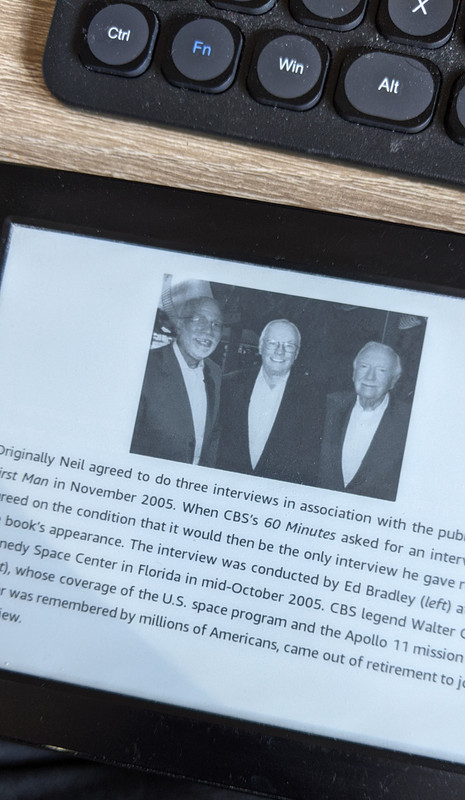
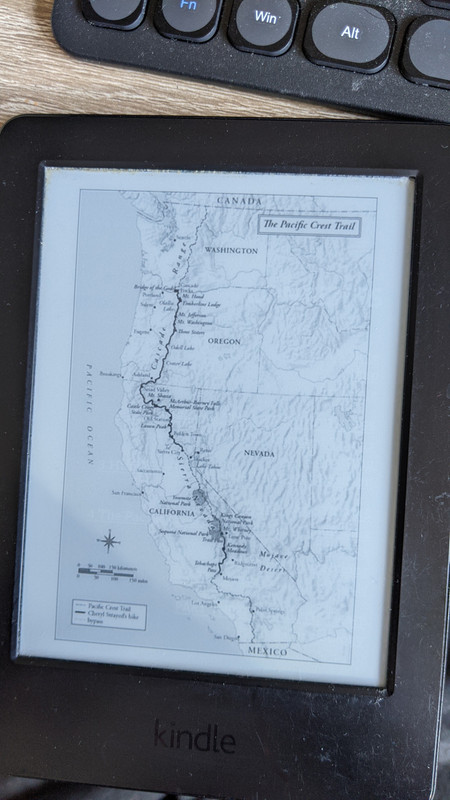
Yeah, you can see photos and maps on a Kindle. But they're a pain to refer back to when you're a 100 pages on, and nothing like as easy as it would be with a proper book. The photos often lose a fair amount of definition compared to the ones you'd get in a hardback book (less so compared to a cheap paperback printing), and that's ignoring colour. It's not a huge problem, more of an irritation.
I stand by my previous comment: Kindles are great (better than paper, even) for reading fiction (or any book that's basically 100% text).
But they’re a pain to refer back to when you’re a 100 pages on
Trouble I had finding that one! And then getting it back to portrait!
Totally agree with what you're saying. Was just showing for the poster who wondered about viewing stuff like that.
We looked at one for my mum, however she is a big user of the local library and Kindles don't link to it. However Kobo does - but it has a smaller set of books you can buy!
Go for one of the new waterproof paperwhites.
More isn't necessary, but the paperwhite lighting is nicer and waterproofness genuinely useful, if only for peace of mind.
Get a simple flip case as well.
Big Kindle fan here
Back light and large print got my mother through the wait for her cataracts to be done
Question for the hive mind
I have the latest paperwhite. If I fall asleep reading it I often find I've changed the font size. To change it back needs two precisely located clicks so I must be missing a short cut. Any ideas?
I've had a couple of Kindles but now have a Pocketbook Touch HD3.
It's way more flexible in terms of formats you can use without farting about with Calibre. Plus I don't have to give Amazon a single penny.
Whatever you get, make sure it's a waterproof version. (You only need one child throwing "daddy's book" into the swimming pool incident to convince you of that.)
Adverts...I wouldn't pay extra to lose them...it's a static screen when the Kindle is asleep, normally just another book they think you'll like. Occasionally it'll offer you a £50 kindle cover or charger etc.
I think I'm on about 150 books so far and I've previously clicked through the ad about three times.
One of the best things about the kindle is you can read the first chapter or three as a sample, if the book doesn't grab you, you can just move on and try something else rather than wasting £3 or £4 on it. Strangely my wife recently admitted she *never* uses this feature! I find it quite useful, I like travel books and sometimes they can be pretty boring!
We also use the same Amazon account for both devices which works fine, the only time it gets confused is if you both overlap reading the same book, one of you has to go on airplane mode otherwise it tries to sync to different pages
The Kindle comes with an email address, so you can email docs/pdfs to it, for pdfs if you put 'convert' in the subject on the email, the pdf will be converted to the kindle format.
3G/4G Kindles come with a global SIM so you can download books/receive email in a hell of a lot countries worldwide.
Main reason I choose books over the Kindle is the amount of words on a line. I have mine set in landscape mode because I don’t like the “4words next line 4 words next line” etc etc constant jumping down the page.
I don't understand this.
The size of the screen of a Kindle is about the same as a paperback book. You can set the font size larger or smaller than the text in a paperback book. So if you're only seeing four words on a line then it's your own fault for sticking in 48-point cataract-o-vision.
I don’t understand this
True fact
Remember not to order four of them at once
There are loads of other books that don’t need pictures, maos and diagrams.
Although books on 20th century Chinese history aren't among them.
One of the best things about the kindle is you can read the first chapter or three as a sample, if the book doesn’t grab you, you can just move on and try something else rather than wasting £3 or £4 on it.
Or you can just ask for a refund if you don't like the book. I think you have 7 days
I've only used for genuine accidents but I know people that just use it as try before you buy....