 You don't need to be an 'investor' to invest in Singletrack: 6 days left: 95% of target - Find out more
Anyone able to comment on if its decent?
I'm looking for something, primarily with as good a camera as I can get for no more than £700. And also has Satellite SOS functionality and a decent IP rating.
Everything else is secondary.
Which I think means Pixel 9 or iPhone 14 and up.
I'm indifferent between Android and IOS from a general user interface perspective, I just get used to whatever, although I do slightly prefer the additional privacy setting I 'think' I get from Android. Not much gaming happens.
This may help, recent thread - https://singletrackmag.com/forum/topic/pixel-9-pro-users/
Not sure about the SOS functionality, I ended up hanging onto my galaxy S20 for now in the end
iPhones aren't as water resistant as the IP rating would suggest they should be in my experience. No idea about Pixels.
Not specifically the 9 but,
I have a Pixel 7a and it would take some convincing for me to consider other options. It's probably the first phone I've owned since the days of Nokia feature phones where I can genuinely say that I cannot fault it. It's fast, it has a decent camera, it gets regular security updates, storage is half full.
Maybe the latest HTC?
Similar to cougar, I'm on a pixel 8 pro and it's decent. I didn't think the pixel 9 spec was worth it over the 8
Google have a sale on right now.
Best camera I've used is a Samsung note 24?
8 has a Good IP rating and macro on the camera 8a has no macro
+1 on the pixel 8 pro. a really really good phone - i just upgraded from a pixel 7 and i also upgraded my other half from her pixel 6a. Buy from google with the included fitbit which you can sell for about 70 on ebay and you've got an aincredible phone for about £440 after fees. Even less if you have something to trade in.
I wanted the 5x zoom and better telephoto camera and my other half benefited in the same way along with the bigger screen as she does all her life admin on the phone.
If you must go Pixel 9 or 9 pro then google are doing 25% off them via some works perks portals. e.g. health service discounts (no need to validate or be a health care worker, just register with a personal email).
I really like my Pixel 8 and since they’re sub-£400 from the right place I’d not be bothering with the 9.
I had bad experiences with several Pixel phones, but they were cheap.
OP: are you saying Satellite SOS is a MUST have or nice-to-have?
I’m indifferent between Android and IOS from a general user interface perspective, I just get used to whatever
What are you, some kind of mature adult?
What are you, some kind of mature adult?
I can assure you, no. If anything, I'm probably being deliberately indifferent to annoy people who aren't.
I like my Pixel 7 and will upgrade to the 9 at some point, possible this year when the 10 comes out and the 9 goes on sale. It's worth keeping an eye on HotUKDeals (or set up an alert) because good phone deals are regularly posted on there.
I'm running a Pixel 6 and will likely got for a 9 Pro later this month.
Having done a bit of research I really can't find anything I'd want that it doesn't do.
Didn't bother looking at any iProducts as previous experience with them was bang average.
Not specifically the 9 but,
I have a Pixel 7a and it would take some convincing for me to consider buying another Pixel. I utterly loathe it, perhaps not quite as much as the Samsung I had before, but certainly even more than the 3a that I had previously. I bought it mainly as the camera on the Pixel 3a was so good, but the camera on this model is woeful, so much so that I take the 3a with me if I want to take any pictures.
The battery life is shit too, but that's probably due to using it so much
I’m running a Pixel 6 and will likely got for a 9 Pro later this month.
Having done a bit of research I really can’t find anything I’d want that it doesn’t do.
It was the 5x optical zoom that made me consider the upgrade. Looking at the cost difference to the 9 Pro, the 8 Pro seemed the logical choice.
Conversely my 8 has a fantastic camera, AFAIK they're much of a muchness between the 8 and Pro (despite specs) so always worth including the 8 in any comparisons.
I do have the pink line of death, it's been behaving recently but I will need a new screen at some point. It's a known issue though so there's an extended 3 year warranty for that issue, new ones shouldn't have it.
I have a Pixel 7a...but the camera on this model is woeful,
Marques Brownless and his millions of viewers disagree...
I just broke my pixel 7a, after much swithering got myself an 8 to replace it... Just now there's better deals on the 8 than the 8a which ruled the 8a out...and the 7a while as far as I'm concerned is still perfectly decent, isn't as cheap as it should be at this point imo.
I looked hard at the 9, and it definitely did seem better- screen's just that bit nicer in the flesh, camera according to people who understand phone cameras is better, and apparently it has better battery life/management. But the difference didn't seem worth it, especially as they're trying so hard to sell it on AI features and I prefer my rocks not to think.
Only just setting it up, which as ever is a pain in the arse but still much easier than I always expect. I'm always wary of being part of the google evil empire, but on the other hand they do make things work together well. I'd smashed the old phone so I couldn't do the clever transfer stuff but it's still pretty painless. Never had a pixel I didn't basically get on with tbh
I utterly loathe it, perhaps not quite as much as the Samsung I had before
I dont mind the Samsung I currently have. Is it a user interface gripe you have ir something else?
I've got one, I quite like it, I'm even starting to use the AI thing. Great battery life, seems robust and fast.
I had no clue it has a satellite safety function. I'll have to investigate that.
8 pro here i love it, massive upgrade from a xiaomi, does everything i want at much faster speed.
Pixel fan here, too. Still perfectly happy with my 3aXL. Managed to convince my wife to splash out on an 8 in the Black Friday sales - she has spent years refusing to spend more than £150 on a phone, then moaning about how they're not great - and now she's a fan too.
Still getting used to my Pixel 9, I'm not a fussy or savvy phone user, just picked up a deal in a similar price to my defunct 4a.
Question for the experts though, is there an easy way to take pictures without using the touchscreen, say if you're riding with clumsy winter gloves on? I was sure you could use the clicky buttons on the side somehow but can't find any mention of it.
I'm currently using my GoPro 8 for photos on rides for precisely this reason, can fish it out of pocket and pap away using the rubberised buttons, but I would rather have it fixed in front of stem for voice-activated video purposes...
Ta
*I've dropped a bollock on this one. The UK has emergency SOS, not Satellite SOS, that is still just the US.
Balls
is there an easy way to take pictures without using the touchscreen
Double-tap the power button to open the camera app without needing to unlock the phone (note that you will need to unlock it to view photos). Press volume down to take a photo.
Also, double-tapping the back of the phone (or pressing vol down + power together) will take a screenshot. I discovered that by accident, it's pretty handy.
re Pixels: I had a Pixel 3a, was absolutely spot on. Never an issue with it and a 3 day battery life. After about 8 years, I "updated" to a 7a, thinking I was missing out on compatible apps and the 7a was crap - battery life awful, but mostly the fingerprint recognition was useless. Sold it after a week. I've since found an 8a on a contract cheaper than I was on for SIM only, so I've now got an 8a. It's ok. Battery life nowhere near as good as the 3a, which I still have, and use as a mini tablet (still has no noticable degredation to the battery life.) The 3a had automatic rules which meant it knew when I wanted it on silent, and back on ring without me faffing with it. Why the 8a hasn't got that I do not know. 8as face unlock and fingerprint work ok, but not sure I'd go for a Pixel again.
My partner has a Samsung (not sure which model), and it takes better photos than the Pixel 8a.
I have a Pixel 7a and it would take some convincing for me to consider other options.
Similar - have a 6a and as long as it takes a decent photo and lets me use whatsapp, make calls and facebook etc, I have zero interest in the latest and greatest phone and the Pixel does all those things. My contract has literally just come to an end and was thinking about changing it for a Pixel 8/9 but for the cost, it'd offer me no benefits so just going to keep it and jump on a dirt cheap Lebara SIM deal for a bit until it dies.
Short story - Pixels are good (after years of using Sony and Samsung)
I went from a 4a (had that quite a few years) to a 7 about a year ago.... as before, I dont think I'll bother upgrading until the 7 breaks or becomes unsupported, we'll probably be on pixel 11's by then.
There's not much point upgrading phones these days unless your phone is a reall low end budget model, or it breaks, IMO.
Question for the experts though, is there an easy way to take pictures without using the touchscreen, say if you’re riding with clumsy winter gloves on? I was sure you could use the clicky buttons on the side somehow but can’t find any mention of it.
Hey Google. Take a photo .
I've still got a 4a, just replaced the screen for a second time (dropped it again). It's perfectly fine, especially if you've got a rapid charger; but the camera definitely lags behind what's in the OH's iPhone.
I will eventually give in to not having a 3.5mm jack; the 8a is the "also consider" choice of most reviews of the best Android phones around.
Double-tap the power button to open the camera app without needing to unlock the phone (note that you will need to unlock it to view photos). Press volume down to take a photo.
Bingo! Thanks.
Hey Google. Take a photo
Thanks, had been trying that, must need to change settings somewhere in background. Thought you needed the camera app open first anyway which would have required clicky buttons regardless I think.
To activate voice control on a Pixel you should be able to follow the below steps. It is handy for activating Spotify handsfree when driving, or taking photos/selfies.
Open the Google app
Click on your profile icon in the top right corner
Click on Settings
Scroll down to the Google Assistant section and click on it
Scroll down to the section labeled General
Toggle on Google Assistant.
Thanks, had been trying that, must need to change settings somewhere in background.
On mine, pressing and holding the power button activates voice commands. I think it's a setting somewhere though. The 'legacy' operation of the power button to actually switch the thing off / restart is power + volume up.
Google have offered me £100 credit as the next software update will impact batteries on some 4a's inc mine. I was considering the 8a but the price has just jumped back up to £499 from £369. Seems good value at £269.
I'm still on Pixel 5. Been put off newer pixels due to screen fingerprint sensor issues on wife's 6a (it barely ever works, always has to try 3 times and then put her PIN in) and stories of it not really being much better on any newer Pixels.
What have you lot found on yours?
I also got the £100 discount for having a 4a, which is fine at the moment but presumably is about to suffer battery issues. The 8 is cheaper than the 8a at the moment, and with £100 discount plus £109 trade-in (estimate), the 8 is £240 which seems too good a deal to pass up. It would be nice to have a better battery life, but there doesn't seem to be any options (pixel or otherwise) for small-ish phones with good battery life any more.
The 8 is very good value. Reviews suggest the 8a is a bit more ergonomic and I'd prefer a composite back. Not that I'll notice once it has a gurt Spigen case on it.
Is that 4a thing for real?
I replaced my 4a at full price a month or two ago 😥
Trying to figure out if it's worth fixing as it stopped reading the SIM card (and no, it wasn't the SIM at fault...).
I’m still on Pixel 5. Been put off newer pixels due to screen fingerprint sensor issues on wife’s 6a (it barely ever works, always has to try 3 times and then put her PIN in) and stories of it not really being much better on any newer Pixels.
What have you lot found on yours?
I find it reliable* on my 7, and that's with a screen protector on too.
*you have to make a concious effort to place your finger on properly and wait a little bit longer than you'd want and it works every time.. if you just briefly tap it or don't get fully 'square contact' i.e. your fingertip is on its side a bit too much, it dosn't work.
On the 8a the finger print sensor works a treat for opening the phone to accessing banking apps
Never had a fingerprint issue outside of my hands being manky with something.
Also, double-tapping the back of the phone (or pressing vol down + power together) will take a screenshot. I discovered that by accident, it’s pretty handy.
Depends, mine turns on the torch.
The 3a had automatic rules which meant it knew when I wanted it on silent, and back on ring without me faffing with it. Why the 8a hasn’t got that I do not know.
Keep looking, my 8 has it and I can't imagine why the 8a doesn't.
Settings > Sound and Vibration > Do Not Disturb
There was a problem with the under-screen fingerprint sensor on some of the 6's but then Google published a list of approved screen protectors. I used one of those and it worked fine. I now have the 8 and it works fine with the "generic" screen protector fitted to that.
Registering more fingerprints in settings also helps
Keep looking, my 8 has it and I can’t imagine why the 8a doesn’t.
Settings > Sound and Vibration > Do Not Disturb
It wasn't that... I used to manually put my phone on silent when I arrived in the office. Then one day it said, "do you want to enable this as a rule?" I said yes. And from then on it went on silent whenever I was in that location. All I had to do was say Yep, do that!

Yeah! Cheers, I just found that after my last post... must've been enabled by default on the 3a 🙂
Putting it face down should work as well via the menu I posted, good for ad-hoc downtime.
That location one is handy but really rough, I can only narrow it to a 100m radius of the general location of my office unless I connect to the WiFi (which I won't be).
Been put off newer pixels due to screen fingerprint sensor issues on wife’s 6a (it barely ever works,
I'd have to check to be certain but it's in the other room and I can't be arsed to move but, I think there's an "I have a screen protector" option in settings which increases the sensitivity.
I really want the emergency satellite SOS feature - but do our operators in the UK support it? Can any of you Pixel 9 owners confirm that it works? If so I'll upgrade right now because I really want this feature.
I’d have to check to be certain but it’s in the other room and I can’t be arsed to move but, I think there’s an “I have a screen protector” option in settings which increases the sensitivity.
There is... At least there is on the pixel 7... Dunno if that's all pixels or if it's just on certain models.
Finger print sensor is 99%on my 7 and I've never used the setting option.
I really want the emergency satellite SOS feature – but do our operators in the UK support it?
I believe Garmin are handling the satellite SOS calls, for the USA at least. I suppose they could also handle other regions as the service is rolled out. This will be the same way that SPOT has done it for years. A central call handling team will route it to the regional emergency authorities.
And on 8
Settings > Display and Touch > Touch Sensitivity
something that struck me as interesting, there's been a bunch of android changes that I basically hate over recent years, every update seemed to introduce some change on my 7a like "suddenly without any explanation the power button doesn't take you to the power menu and you have to do a secret keypress to do that, now the power button activates speech activation or some such bullshit". But setting up my new 8 highlighted a load of these instant changes and told me straight away how to change them back to the legacy settings and so my new phone has a power button that works.
The actual setup process gets easier every time but that earns google a massive ****-you, clearly they know this is hassle enough to draw it to the attention of a possible returning yser with a new phone but they don't deign to do it for people who're already using it. I'm sure if I had bothered I could have trawled through menus and found the setting but the new phone took me right to it the very first time I pressed power.
The power button is an interesting case. I mean, I know why there has to be one, but of all the things I'd like a button for, powering off my phone is way down the list of priorities.
Oh I'm absolutely sure that if I got my first ever phone today I'd not expect it to have a power button. But it's a fixture, if you're going to take it away you have to do it right. Which they have done for the "new user experience" but not for the "existing customer who is used to the phone and how it works"
My power button fires up the camera, obviously. At least it also puts it to sleep which is kinda like powering it down‽
I've got an 8, it's good. Had the pink line of doom issue, but Google repaired no questions asked. Previously had a 7, which I lost in a woodland (hence the purchase of an 8). It was outside from December to July and once repatriated it has worked perfectly. So, I'd say the IP rating on it is OK.
A non-functional power button together with a non-removable battery sounds like a disaster waiting to happen.
"My phone's crashed!" - have you tried turning it off and back on again? - "I can't!"
“My phone’s crashed!” – have you tried turning it off and back on again? – “I can’t!”
Back in the day some brands like Sony had a clever emergency off button in beside the sim tray
Also just got an 8 which is dissappointingly almost identical to the 4a which it replaced, although the camera is much better. I think the battery life might be a bit worse. Screen is the same, it's roughly the same size, and for the stuff I use it for, the performance is pretty much the same. Meh.
I do now have £35 Google Store credit to use up or try to sell on, if anyone would like to help me turn it into actual money?!
A non-functional power button together with a non-removable battery sounds like a disaster waiting to happen.
“My phone’s crashed!” – have you tried turning it off and back on again? – “I can’t!”
Power button and volume+ and the restart menu appears
13thfloormonkFull Member
Is that 4a thing for real?I replaced my 4a at full price a month or two ago ?
Trying to figure out if it’s worth fixing as it stopped reading the SIM card (and no, it wasn’t the SIM at fault…).
Interesting to hear you had that problem with the SIM card - mine intermittently decided it couldn't read the SIM. Eventually solved by slipping a small piece of paper in the SIM tray behind the SIM card - haven't had the issue since.
As for the software update, that's surprising, if only because I understood Google had stopped pushing out software (or security) updates to the 4a about 18 months ago?
I also saw the price of the Pixel 8a had bounced back up last week, but it is still available cheaper through some retailers
Strange this, my pixel 9 pro uses the power button as intended and a double tap of it starts the camera. All these can be changed int he settings.
Power button actions on mine are tap = sleep and press and hold = power/restart menu.
In Gestures you configure the power button press and hold to access the power menu. Mine has been set at that on Pixels for ever so cannot remember if that was the default.
Satellite SOS setting does not work in UK (?yet)
Power button and volume+ and the restart menu appears
I know, I posted the same thing on the previous page.
Mine has been set at that on Pixels for ever so cannot remember if that was the default.
Holding the power button on my 7a launches Gemini, the AI artist formerly known as "OK Google." That's not something I would have consciously configured so I'd assume is the default. I think the only gesture UI setting I changed was putting the three buttons back on the bottom of the screen.
A non-functional power button together with a non-removable battery sounds like a disaster waiting to happen.
And yet a certain fruity flavoured fhone has worked quite happily in this manner for a decade. Just because it’s different doesn’t make it bad, in my view.
Holding the power button on my 7a launches Gemini, the AI artist formerly known as “OK Google.” That’s not something I would have consciously configured so I’d assume is the default.
As Northwind said it may have been changed. Mine (8) certainly goes to power options if I hold. That said Gemini is going nowhere near my phone so that may have something to do with it.
As Northwind said it may have been changed. Mine (8) certainly goes to power options if I hold. That said Gemini is going nowhere near my phone so that may have something to do with it.
Until yesterday my 6a launched Gemini if I held down the power button. Prompted by this thread, I changed it and it now gives power options.
Holding the power button on my 7a launches Gemini
Same. I say "Shutdown the phone" to it. 🙂
Last night I had the "update your Android 13" message on my Pixel 4a. Based on what a couple of folks said on here I looked around and see what you mean about the "software update that kills the battery of the 4a".
Coincidentally Google has raised the prices of Pixel phones on its own store, thus negating the benefit of the store credit they're handing out...
Coincidentally Google has raised the prices of Pixel phones on its own store, thus negating the benefit of the store credit they’re handing out…
That store credit for the battery issue?
On the flip side it's easy to find a 25% off Google store code on work perks the are straightforward for anyone to sign up to (perks at work, healthcarediscounts).
And using your 4a as a trade in (£262) gets you a pixel 9 for £337.25. pretty good!
Pixel 9, update, Satellite SOS appears to be available in the UK
[img] 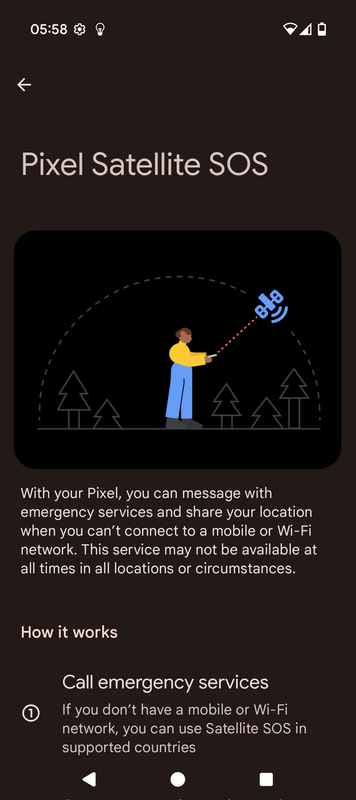 [/img]
According to .... https://9to5google.com/2025/03/04/march-2025-pixel-feature-drop/
Satellite SOS is expanding to Hawaii and Alaska in the US, Canada, the UK, and Europe on the Pixel 9 series. Service is free for two years, with users able to contact emergency services when there’s no cellular connection.
Nice...not available on my 9 Pro yet so assuming it is being rolled out in blocks and maybe by provider...