 You don't need to be an 'investor' to invest in Singletrack: 6 days left: 95% of target - Find out more
Got a VIA 8 channel card on the motherboard with 3 phono jacks at the back - not entirely sure what each one does mind.
I have a cheap 2.1 active setup on it driven by a separately powered box. Its started to produce some interference noises which I cant isolate. Its not particularly special so was wondering about a set of passive speakers, but have no idea what kind of output comes out of the Via card, what it will drive, or what kind of passive speakers are worth considering if at all.
Any pointers out there? Cougar and Co?
If you're having to use active speakers with it now then it probably won't have enough power for passive speakers.
the active speakers are a hangover from another system. This is a new box of goodies.
I think I'd be tempted to try the speakers on another device, plug 'em into a phone or an mp3 player or something. That'll tell you whether it's the speakers or the board.
Look for a manual for your motherboard - you might have got them wired up 'creatively'.
Incidentally,
Some active speakers will work as passive speakers if you switch 'em off. Possibly not if it's some fancy surround system though, but perhaps worth trying.
its a very odd interference.
Even if the OS is set to mute after about 5 minutes of complete silence a gentle buzz starts. Then if I press mute or unmute, the buzz goes and we have silence again for five minutes.
Very weird.
Things is I have the speaker drive connected to a single phono jack on the board. The green one.
If you can, try moving cards round in slots on the motherboard. I've seen this sort of symptom caused by interference by add-on cards (though I'll grant you, not for a very long time). It's a long shot, but worth a punt if you've exhausted other options.
Latest drivers for the soundcard, settings correctly for the speakers you've got connected, all that happy stuff?
urrrgh. hate having to open up the box
will have a tinker on the soft side first. Its a brand new build too, VIA sound card on an Asus i5 MB. maybe try a different phono socket. There's one on the front I can try too...
RTFM? (-:
If there's multiple connections, you may be able to reconfigure what they're used for.
Entirely possible that it's broke, if it's new. I'd test the speakers separately ^^ first.
Actually,
it's not just a loose connection is it?
I doubt it as it wouldnt show the behaviour I get when I mute or unmute which stops the buzz.
hang on. Ill put the netbook down and go up to the office for a tinker...
Take the netbook with you as a sound source.
I doubt it as it wouldnt show the behaviour I get when I mute or unmute which stops the buzz.
I was wondering if in muting it you were subtly moving the desk or something. But you're probably right. Sorry, I'm not 100% today, think I've got manflu.
Ive moved the phono connection to the front panel and get even more interference, straight away 8)
Have checked with the netbook as a source and thats much cleaner...
so looks like im going to have to dive inside and maybe try a different expansion slot (if its a PCI card) - cant remember whether its board mounted or PCI.,...
Cougar - is it possible to get a PCI sound card that will drive 2.1 speakers?
I don't hold with all this passivity. I prefer my speakers to be a bit militant.
Shaft!
[url=
Clicky picky for to makes nice musics.
Of all the little PC speaker systems I've heard, the Harmon Kardon Soundsticks are by far the best. Sound like a proper stereo, not some tinny cheap tat. Active, but then you'll need something with amplification straight from the computer.
[img] 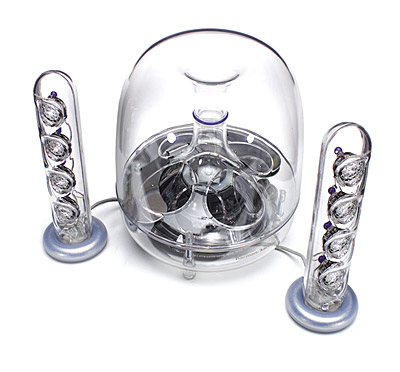 [/img]
im trying to see if I can reduce the number of power boxes around and about. So was investigating either passive speakers or PCI amp.
There's already a lot going on in here:
[img]  [/img]
When you say the netbook is better, is it "better" or "unaffected"?
If the latter and it's a new build, I'd consider firing the board back as faulty. Assuming there's no shorts on the board (it's easy to leave case mounting posts where they don't belong).
I don't see any reason at all why you couldn't get a daugherboard soundcard that does what you need, but I've not bought one in forever.
WRT moving cards, I was thinking about relocating other add-on cards, graphics card and such if that's possible.
netbook has no interference. Which is to be expected as the mute/unmute action is on the desktop/OS.
cant get the board back (long story)
SO Im going move cards around and see what happens.
Do you have your speakers connected using a 3.5mm headphone socket, or a bigger RCA/phono connector as used on Hi-Fis?
I used to get interference after a while the previous time i'd rebuilt the OS on my computer, after Microsoft's Windows Update upgraded the drivers without me realising. Sometimes, it'd get crackling over the audio and the onyl way to stop it was to restart the PC, it was random in the way it started doing it
its a four contact 3.5mm phono
the interference is clock driven, not cable. Must be because it can be stopped just by making a change to the sound card controls (mute/unmute/vol+vol- etc)
Bugger.
You could try improving the ground/earths between motherboard & case to see if that helps. If you've any other interface cards plugged in, pull those out if you can & check the effect, incase it's not the MoBo causing it.
Could be worth investigating the soundcard software, then the drivers. Let Windows use whatever basic ones will work (or just us the stock drivers that came with the motherboard), and rebuild bit by bit.
will do. cheers dave. and of cougar, reliable stuff as ever. will report back after the weekend and see if I have it sorted.