 You don't need to be an 'investor' to invest in Singletrack: 6 days left: 95% of target - Find out more
My desktop PC at home keeps switching itself off and on again. What's wrong with it? I strongly suspect that it might be rather full of dust and fluff, might this be 'shorting' something inside and causing the problem?
Thanks, you clever computery type persons 🙂
If you suspect its full of dust it will be overheating, take the case off and hoover it out
... and check that the fans are working correctly, especially the one on the processor.
Yep hoover it.
However DO NOT hoover the fans in such a way that they spin around in the suction. That's bad!
Thanks 🙂 will have a bash/sook tonight.
God, this takes me back to working in a computer repair shop - some people's computers were [i]horrendous[/i] inside! But a dusting never fixed a problem - usually the fan on the CPU had packed in anyway. If you're footering inside the PC tonight Jo, try turning it on with the case off and see if the fan's spinning. Just don't touch anything inside when it's on! 😉 And if you do want to mess about inside, leave it plugged in but with the socket switched off to discharge any static through the case.
Other issues with rebooting - f*cked motherboard, f*cked RAM, f*cked Windows. Or something else...
I hated that job. Incidently, my (ex)boss is now the richest man in Scotland, or something - Shaf Rasul.
Bit grubby inside?
[img] 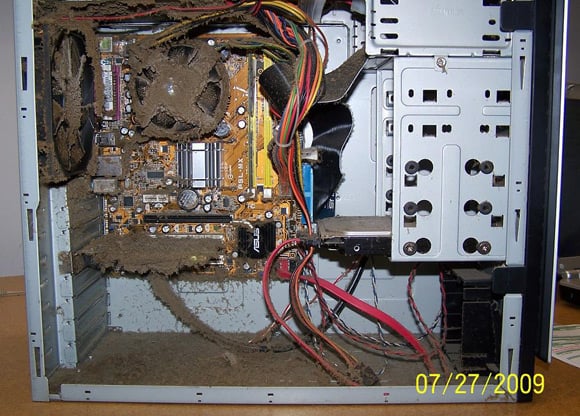 [/img]
More dust bunny horror here:
http://www.theregister.co.uk/2009/11/13/ventblockers/
OMG!
It's most likely a fan problem.
But don't hoover inside, static builds up on the nozzle due to the airflow and you can potentially do damage.