 You don't need to be an 'investor' to invest in Singletrack: 6 days left: 95% of target - Find out more
Hi all
I've taken the plunge and have converted to the world of Mac!
Just wanted to know if anyone else had some minor issues such as safari shutting down when it feels like it and losing the wifi connection randomly?
Also....is there a delete button or do you have to use the flaming back space thingy all the time?!! 😯
As the weekend progresses I may have other questions so I hope you can help!
PS - I have transferred my iTunes ok and that's the main thing!
I'm a relatively new convert as well. Took me no time to get used to it, and now at work on Vista I find myself trying to Mac keyboard shortcuts.
Not had any problems with Safari...but you're right about the delete key!
It doesn't really matter if it's a pain in the arse to use...it looks so good!
There's a delete key just to the right of the enter key. It says "delete" on it...as a small hint 🙂
EDIT: It seems there's a new keyboard 😳
fn and backspace = delete
Not on my keyboard there's not (DD)
Cheers Carbon
Well hopefully the safari thing is a one off!
What shortcuts are there then? I have to say it's really easy to use though! The only thing I'm disappointed about is the fact i can't use my cam in messenger so have downloaded Skype for now. If you know of anything else that works please tell me!
If you've got one of the mini keyboards, use Fn+Backspace to do a forward delete.
Full size keyboards have the proper key 🙂
Do you get any error reports when Safari quits unexpectedly?
alt and 3 = hash #
alt+cmd+esc = force quit for failing applications (like ctrlaltdel on windows)
If using safari dont use tesco direct - it will crash safari. I am actually having issues with my safari crashing when using heavy embedded flash. Trying Firefox to see if its better.
Curry's deal everyone? Got one last week, liking it so far.
Deadly - depends on which keyboard you've got, to the right of my enter key is... my leg.
Cheers Carbon.
Bah, I'm too slow even with a mac!
I don't have a delete key for sure (and thanks carbon, it works!!)
Is this not what you mean?
[img] 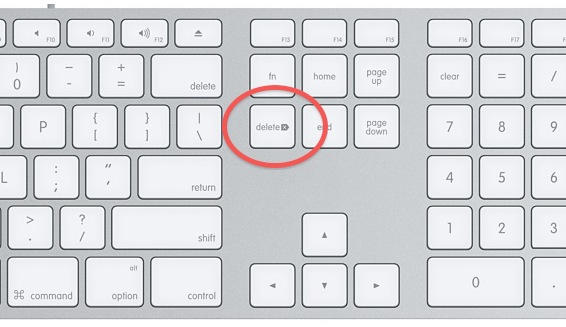 [/img]
Ah, ok I see...I just assumed everybody got the same keyboard as me (it just came in the iMac box)
Oggles yes I do so I've sent them off
Edit - I have the diddy keyboard 😉
presume you have one of the mini keyboards?
I prefer Firefox to Safari on my Macs (other browsers are available).
i didn't know you could have them - i presume you download as normal?
Another handy one - when typing cmd + right/left arrow is like home and end on a windows keyboard.
Cmd + up/down when typing highlights text. When not in a text window it takes you to top of a page or bottom of a page.
Print Screen - # Hold down Apple key ? + Shift + 3 and release all
# then use your mouse to click on the screen
Print a portion of screen - # Hold down Apple key ? + Shift + 4 and release all key
# Now, You will see the mouse cursor will change to + - drag around your capture.
Also - dont take this the wrong way but Google is your friend here. a term like:
mac keyboard delete into google will help you or mac print screen
some keyboard shortcuts and functions, there are too may to list fully though :
Cmd-Space Spotlight, which apart from searching, is a good app launcher, performs calculator functions etc
Cmd-Shift-3 Screenshot (full)
Cmd-Shift-4 Screenshot (defined area; or press space to select window)
Cmd-Ctrl-D Dictionary definition when hovering over a word:
[img]  [/img]
i didn't know you could have them - i presume you download as normal?
Yup - http://www.mozilla.com/products/download.html?product=firefox-3.6.13&os=osx&lang=en-US
The top and bottom arrow is great and the other tip is good too - fanks!
just another question, what happens to stuff when its downloaded? i seem to do it but then can't find anything
Downloads are at the right hand side of the dock, by the bin.
Have you tried the tutorials on the Apple Website? They're pretty good.
It'll be in your download folder - find it with spotlight.
what if i deleted that by mistake?!!
Aleigh; you can use the webcam to take saucy pics of yourself, then email them to me! 🙂
It's really easy too. Want me to show you how?
X
Aleigh; you can use the webcam to take saucy pics of yourself, then email them to me!It's really easy too. Want me to show you how?
😯
no its ok....I don't use my cam for that!! x
edit - found the folder!
Really? I do. Got me own website and everything.
Go on; I won't show them to anyone, promise.
Elfin, you are a very bad boy. It's the naughty corner for you. 😉
😀
Only if Aleigh joins me....
Aleigh - MS Messenger for Mac was recently updated and does now support the webcam - you can download it here: http://www.microsoft.com/downloads/en/details.aspx?FamilyID=14b79079-f247-494a-a383-2f4ec1ba965c&displayLang=en
I absolutely love my MacBook Pro. Changing between your old PC and your new Mac will take a while but it will be worth it.
Oh - and Apple are to introduce an new App Store for the Mac on Jan 6th - just like there is on an iPhone. Will make purchasing and updating software really easy. (though I'm sure someone on here will be along to tell you that it represents pure evil or something...)
Have fun!!
Rachel
I recommend "Click to flash" for Safari. Disables flash unless you want to see it.
Also install the "iStat pro" widget on the dashboard. Tells you a lot of useful stuff about how it's running.
I set a Hot Corner to show dashboard. Others to show desktop, all windows etc.
Also install the "iStat pro" widget on the dashboard. Tells you a lot of useful stuff about how it's running.
I would suggest that someone struggling to work out how to delete text and being unable to find that out for themselves is unlikely to care about their CPU usage etc. etc. or act on that information at all!
This google site might be handy:
http://www.teachparentstech.org/
(not just for parents, many handy how-tos.)
Another handy tip - if you're not sure how to do something or where the menu option might be for some task, go to help and type in the blue box. It'll show you results for menu options and help topics that match what you're trying to do.
Thanks Rachel....knew I could count on a girl to tell me about MSN!
Effin, I am now celibate....
You guys have been great - I'm sure I'll have more questions and hopefully you can help me but I will try and sort myself out of course!
Oh one thing....how do I uninstall stuff?!! I've got a bit carried away 😯
I think uninstalling is as simple as deleting it from your applications folder. You can also "spotlight" and other folders and files with the application name and get rid too. What have you downloaded that you now hate then? 😉
There are discussion forums on the apple website with excellent technical help (but often not as fast an answer as here) 🙂
Have you tried Chrome on the mac as a browser? Works very well.
Appcleaner is a free download that will trash all the preference files for an app as well as the app itself. Just drag the app to the Appcleaner window and it finds all the other stuff ready for deletion.
Adium is an alternative to Messenger which does webcam chatting.
trash all the preference files for an app
Ah, thank you very much sir. That's what I was thinking of but couldn't remember 
cmd + w ...closes the frontmost window
cmd + m ...minimizes the frontmost window
cmd + click link in safari will open the link in a new tab
alt + click link in safari will open the link in a new tab but keep you on the current page
ctrl+alt+CMD and 8 is a good shortcut, inverts all the colours. Useful for nothing except practical jokes.
i've downloaded different forms of messenger....! skype is one i may get rid of now as well.
the alt + click thing to open a tab isn't working for me - or maybe it's me?!
Skype is much betterer Aleigh. You can video chat with me, with Skype!!!! 😉
(Runs off to find best saucy undies..)
X
Greetings from Slovenia.
To open a new tab you can also click on the plus sign on the top right of the Safari header.
Hi Pete! Hope the weather is okish for you?!
Effin, I'm an MSN gal so won't be chatting to you on Skype! x