 You don't need to be an 'investor' to invest in Singletrack: 6 days left: 95% of target - Find out more
Following on from my previous thread i'm finally getting around to sorting out a new pc.
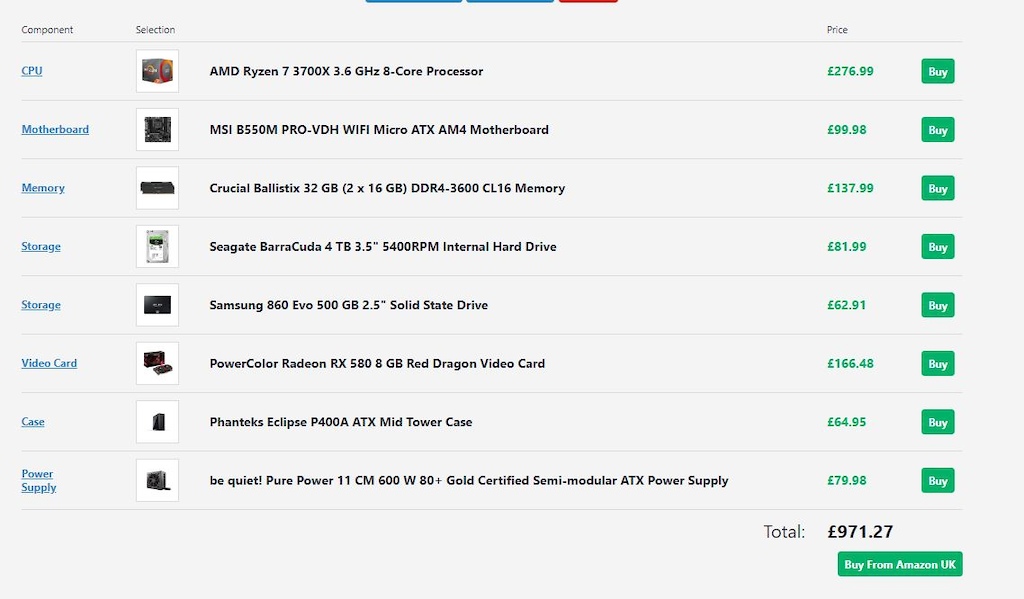
Currently the build is like this:

Any suggestions on how to get the cost down a little bit or any parts that aren't any good? It's about 200 quid more than I ideally hoped for.
Usecase is mainly photo editing, surfing the web, maybe a bit of data analysis / machine learning (probably not much tho), and a bit of video editing (potentially 4k).
The graphics card is the obvious place to cut back on, as I don't game, but my understanding is that I need a beefy card to edit 4k video... (e.g. with divanci if I can be bothered to learn it)
Cheaper case, PSU and swap the mobo to one with onboard WiFi.
Are you aware how big that Fractal Design R6 case is? I have one, it's bigger than I expected. It almost sucks all the light out of the room! It's over half a meter deep, 465mm tall, 233mm wide, and weighs over 12kg! It's ain't no Zoostorm case that's for sure! But I'm happy with it, and it'll probably outlast the coming apocalypse, so all good!
Also if it's a desktop won't you be using ethernet so no need for wifi at all?
Perhaps go for a 512gb SSD depending on how you're intending to use it? Mine is 128gb and it's more than enough for the OS (Linux) and software (all within a 24gb partition infact) and then the rest set aside for current small video editing projects (1080p) and a handful of big games with everything else on the HDD.
Ryzen 5 3600 for gaming... save a few bob. Go for a 2070 though
The Corsair power supply I initially ordered for my build was soooo loud I ended up sending it back. It could be worth spending a bit more on a quieter one that doesn’t spin up until under heavy load. I went for a Seasonic FOCUS Plus Gold 550W in the end and despite being £30 more it was totally worth it.
As mentioned above you could get a motherboard with WiFi built in or another option is poweline adapters.
I have a very similar build to yours, same CPU and a 2070 super for gaming.
Going for a 450 tomahawk max mobo would save £60 off that build and and still comfortably run the CPU. Or go for a WiFi integrated motherboard like an x570 would be cheaper than buying a separate card.
The amd CPU also runs best with ram speeds of 3000mhz+ and could you also get away with 16gb? Can always upgrade in the future if needed.
Could also get a good case for less than that one.
Helpful comments thanks. Good point onboard WiFi - going to move house soon so good chance my office won't be near the router.
Not really bothered about gaming, which is I'm umming and ahhing about the graphics card. Could stick a 1660 super in it but not sure that'll cut the mustard for 4k video editing.
My current case is a fractal design (lasted 10 years!) this one seems to be about 2cm wider and a cm taller. O did have a slightly smaller one selected but then noticed that it would only hold two 3.5 inch drives. Ive got a couple of 2tb drives that'd I'd want to shove in - Def open to other suggestions on the case though. Just want a quiet one that doesn't have a silly transparent light show going on!
Why not reuse the case you have? Just because a smaller case only lists two drive bays doesn't mean you can fit more. If you already have some big drives do you need an extra one?
That ram is utter junk. Spend less on the mobo and get something with WiFi and get better ram.
Don’t bother with an nvme drive either. Should be able to get cheaper sata SSD
If you are using resolve then check out the graphic card reviews on the speed work at and buy accordingly. You might be better with a cheaper 8gb rx580
Price it up on Scan and update as required, just noticed prices have really gone up I paid £290 for the GPU a few months ago.
Don’t bother with an nvme drive either. Should be able to get cheaper sata SSD
Why? This is one area which makes a huge difference, especially if running Windows 10
Could get away with a smaller NVME and then go for larger SATA SSD to hold the non-OS data, but not sure how much this would save vs faff-factor.
If second hand does bother you and you want to save a few ££ I've got a ryzen 3700x and MSI gaming pro carbon motherboard I'm selling.
Drop me a PM if interested.
I was eyeing up posh cases for a recent build and just went for a cheapy Thermaltake Versa H17 - figured it'd a stopgap at worst. It's absolutely fine. ATX seems overkill these days unless you need loads of hard disks.
Also went 2700x instead - £100 less, and something like 6-10% (depending on benchmarks) between them. Quicker RAM will probably make more of a difference.
Like others say, smaller NVMe drive for boot/apps/scratch is fine, keep the slow data on a spinning disk.
Why not just buy this and save yourself a few hundred quid and a load of hassle?
I dont know anyone that still builds their own pcs nowadays. It used to be (about 20 years ago) that you could save yourself a bunch of money. But now just buy off the shelf and get a warranty.
I dont know anyone that still builds their own pcs nowadays. It used to be (about 20 years ago) that you could save yourself a bunch of money.
I'd say that 20 years ago there were three reasons to build your own PC:
1) To 'save yourself a bunch of money.'
2) Because you have an exacting specification that you want to build to, for example a specific model of motherboard.
3) Because you want to.
The first is no longer really relevant as you say, an off-the-shelf box is probably cheaper. The other two however...
You're right though, it's generally good advice in the majority of situations. Even with case 2) above there's a compelling argument for getting someone else to do a custom build for you if only because if it doesn't work properly you can then hoy it back as a lump rather than playing parts darts trying to diagnose it.
It looks very nice dear.
There is a halfway house option also, CCL and others will let you spec up what you want from a selection of 'base models' and build it for £25.
The benefits of an 'off the shelf' PC to your spec and time saving if you dont want to put it together.
What's the deal with getting an os on a self build now? You appear to be able to buy a win 10 key for either £100 or £10. Is this depended on whether you need an os for an entirely new build compared to upgrading an older version?
There is a halfway house option also, CCL and others will let you spec up what you want from a selection of ‘base models’ and build it for £25.
That's what I meant by "someone else," aye. I'd have suggested Scan, but then they're within kicking distance of me is something were to go wrong.
You'll still need a windows10 key for a brand new build.
Genuine win10 from a shop is about £100, or you can buy a grey market key for £10-15 from Amazon or Ebay etc.
What’s the deal with getting an os on a self build now? You appear to be able to buy a win 10 key for either £100 or £10. Is this depended on whether you need an os for an entirely new build compared to upgrading an older version?
More likely the cheaper ones are 'grey' somehow. Like, you can install Windows 10 using a Windows 7 OEM key. Reselling an OEM key is in breach of the licence agreement as they're tied to the hardware they came with but, well, it works and no-one seems to care.
@poah - what's wrong with the RAM? Seems to be up to spec from my untrained eye!
Will look at SSL and scans custom options. I did have a brief look and didn't really find anything.
My main issue with buying a HP or similar is that it'd be an inferior spec (e.g. that one has a small ssd, hardly any RAM, and intels seem to not be great at the moment), and it'll have a custom case / motherboard which will make upgrading a PITA. My current build was from overclockers (they don't seem to do what i want any more) from ten years ago - i've been able to stick a bunch more ram in, add hard drives, etc to keep it fairly ok.
OS wise, I was just going to get a grey market key.
Can't find any option to customise Scan's builds. SSL do let you, but seems to be a significant mark up when i make the spec equiv to what i've put up there, obviously i get a warranty etc, but is that worth 200 quid?
my understanding is that I need a beefy card to edit 4k video… (e.g. with divanci if I can be bothered to learn it)
I'd suggest that you clarify that before anything else as that's your biggest cost sink.
Logical Increments disagree that this is the case.
https://www.logicalincrements.com/articles/videoediting
As said ditch the case, I'd also look at using your existing HDD for secondary storage.
Can’t find any option to customise Scan’s builds.
Here's where you start: https://www.scan.co.uk/3xs
Used them for mine 5 years ago. They stress test the system make sure all the components play nicely together as Couger was saying.
Get an Asus Prime X570-P instead of the B550 and swap the four sticks of RAM for two 16gb. You'll want a beefier PSU ideally as well.
Here’s where you start: https://www.scan.co.uk/3xs
/blockquote>Great - thanks, not sure how i didn't come across that page!
You’ll want a beefier PSU ideally as well.
PC Part picker reckoned a 500w supply gave me 200w head room - is that not sufficent?
Why? This is one area which makes a huge difference, especially if running Windows 10
in reality an NVME vs sata SSD makes very little difference to everyday activities. I'm not being held back in any way with my SSD's in gaming, video rendering or using chrome.
That ram is slow. You could get the AMD card and upgrade the CPU to a 3900x. Given the release of Zen 3 at the end of the month look out for price drops - I might even sell my 3900x and mobo
using the 2060 super

using an RX580
Thanks @Poah that's very helpful. More research to do i think...
As said, the biggest issue with your original spec is the RAM. You want 3200hz+ and 2 sticks of 16gb for best performance.
nvme is much faster than SATA theoretically but from reviews I've seen, it doesn't translate well to actual workloads. Not that price difference is all that much.
PSU is plenty with that build and no overclocking.
Don't get an X570 mobo, the B550 is the best price performance.
For non-gaming, high productivity workloads I think your build is pretty much there save some of the suggestions about RAM, Case & wifi card.
GPU acceleration is hugely software dependent so look at that first before spending on the 2060.
Not sure why someone recommended that HP Envy either, at £1100 it looks awful VFM....
Motherboard with built in AC WiFi would be preferable, but also this might be better than the Asus PCie card (slightly better spec and slightly cheaper):
Also consider, If you are buying lots of parts from different suppliers, the postage costs soon add up, so it's sometimes worth buying all the bits from one place, even if some particualr parts aren't the cheapest, as you'll only be paying one lot of postage.
Does that CPU come with a cooler? If it does, it may be a very basic one so you might need to add a decent one.
stock cooler is reasonable on that CPU, first time i've used a stock cooler for a long time.
wants faster RAM with that CPU though.
i went NVME as it wasn't that much more expensive and it meant less cables, not that that really matters as i have quite a large case and can't see inside it anyway.
this might be better than the Asus PCie card (slightly better spec and slightly cheaper):
Except it's out of stock and the only place I can find it is at Scan for £40. Still cheaper than the Asus there though.
Don’t get an X570 mobo, the B550 is the best price performance
The X570 mobo I quoted is the same price and the one I use, check out the VRM thermal data and it's an easy choice.
Yeh I've heard the new AMD stock coolers are perfectly decent, you'd only want to upgrade if your overclocking or want less fan noise really.
I was planning on using the standard cooler - assumed it would be good enough?