 You don't need to be an 'investor' to invest in Singletrack: 6 days left: 95% of target - Find out more
My wife has a really nice hand-drawn map to go with a series of books she has written (and currently self-publishes on Amazon). Currently, the map has been scanned and inserted into the book, but it could do with being optimised for digital (removing/whitening the background, touching up some edges, etc). And with another book on the way, she'd like to use what she has as part of a larger map.
I'm averagely capable with Photoshop, have never used Illustrator, but have access to both. Is there a reasonably simple way to get her drawing converted properly to digital? For a map that isn't going to be blown up big, and mostly viewed on an e-reader devices like Kindles, which format (vector/raster) would be better? I presume I may have to scan and digitally trace over in a new layer, but there is a lot to trace over, so any shortcuts or tips would be welcome!
Would also like to do myself as at this stage as we're trying to keep costs low.
What kind of drawing is the map? If just lines then you could use one of the edge/colour finding tools and then neaten it up where needed. If there's shading etc then a bit trickier. I imagine a drawing pad would be easier than a mouse but that's a cost outlay if you don't have one of course.
You may be able to find someone to do it cheaper than you think on Fiverr or a similar freelance site, I had good results getting someone to convert a small sketch to a vector image some time ago.
Edit:
which format (vector/raster) would be better?
Again, depends on the style of the map I suppose, if it's hard lines then vector, if a painted artwork then raster?
It is just lines for the most part. There is currently some shading but I think it could be dispensed with - shading doesn't appear great when printed as a paperback (IMO) and on a Kindle, probably isn't adding much.
I’ve done it in Inkscape (free) in the past. Ossify’s suggestion of fivr is probably orth considering unless you actually enjoy this sort of stuff.
If you have Illustrator and Photoshop I'd start there. Illustrator has a pretty good image to vector converter. I find it works better if you use Photoshop first to give the image a quick tidy up and erase anything obviously bad. Lots of tutorials online.
Another option is AI. It sometimes works really well, other times not so much. I've used vanceAI online with reasonable success improving a hand drawn sketch. Use that to up the resolution and it can tidy the image up a bit. You may still want to take it into Photoshop for a touch up but it's easier once it's had some ai processing. You get a few free credits per day, enough for a play and a test
...unless you actually enjoy this sort of stuff.
I enjoy it when it works. When it turns out badly and I realise I've wasted hours of my life is when the rage comes.
It's hard to say without seeing it. A vector image is always better for scaling, but may not work well where you have large blocks of non-uniform colour. Raster to Vector tools may get you some of the way, but it you may have to put some time into creating something which does the original paper illustration justice.
Getting the original scan right is the key. There's scanning and scanning properly.
A hi-res scan [i]is[/i] a digital image. Have you got a pic of the map you can put up (or just a section if you don't want to give too much away).
Here's a portion of it to give an idea, which should show some of the current detail. The more I look, the more I think it'll need to be simplified, but open to suggestions. Thanks for those so far.

That just needs the levels adjusting in Photoshop...
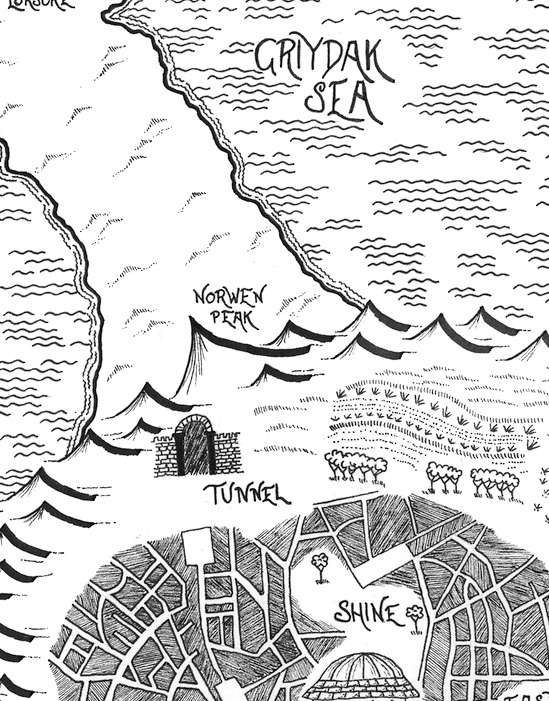
Looks better already. I'll give it a go with PS. Thanks.
No answer to your help request I'm afraid, but do you have a link to the book? It may be something people are interested in. My wife has written several children/young adult books and the forum responded very well to a post I made, she had several downloads as a result and even a couple of long term repeat 'fans'.
https://singletrackmag.com/forum/topic/help-for-my-wife/
Looks better already. I’ll give it a go with PS. Thanks.
Convert it to greyscale first too - better than leaving as RGB.
Kindle readers are lousy for showing any kind of illustrations.
...could save as a bitmap for the Kindle version?
Thanks all. Have started playing around in PS and got it looking better. Going to cut out some elements so a future map can re-use them which should save some time and aid continuity.
First book available here if anyone is interested.
My wife is currently working on book 4, and I'm doing various website things and some social media advertising, which is going fairly well. We're on for a record month of sales and turning a profit. Won't be troubling JK Rowling any time soon, but got to start somewhere!

Ah, nice. Good to see the difference. I will experiment.
Is this the secret map of the trails behind the Nationwide at Swindon ?
Ssshhhhhh. Tell no one!