 You don't need to be an 'investor' to invest in Singletrack: 6 days left: 95% of target - Find out more
Help my dilemma! Made the move over to Apple 12 months ago with an 13” M2 MacBook Air and I’m totally sold. It’s so much better than my work PCs. Problem is I now exclusively work on my laptop and don’t use my desk set up at home - I’m getting a sore shoulder and have a history of bad backs, so know this is stupid. So I ordered a decent spec’d M4 iMac for working from home (I have a decent home office with sit-stand desk). I travel quite a bit so the MacBook is still required.
But let’s be honest an iMac is a lot of money - that I could spend on refurbishing our garden. I had a play with a M3 iMac in the store yesterday and of course it was lovely. In the aim of balance, I went home and plugged my MacBook into my standard spec (non 4K) 27” screen with my Anker USB-C hub and it didn’t play nicely - had to keep MacBook open to run second screen (I don’t want to keep it permanently on charge as that seems to kill my Dell laptops), changing settings was a bit of faff and then it kept blacking out for a second (HDMI cable and hub has been fine when I’ve given presentations at work). Plus of course not being as good resolution as the MacBook screen it felt a bit ‘sad’.
What are your home set ups for your Macs? I’m a University Professor and can spend far too much time at a computer - this isn’t occasional use. I do have to be on campus about 3 days a week in term time but use my work PC (through gritted teeth).
I can still cancel the iMac! I guess that’s the question…
#firstworldproblems
Laptop with a decent desk setup - most importantly separate screen in good position, my wife also has a separate keyboard and trackpad but I haven’t bothered with that. Best of both worlds but price of only one.
MacBook Pro plugged into LG 5K screen with a suitable cable (that part is essential). I wouldn’t buy an iMac as it’s (obviously) less flexible. If I wanted a desktop setup I think I’d buy a Mini.
MacBook Air on a laptop stand hooked up to a Lenovo 4k 32” monitor via Thunderbolt (no hub needed). Open all the time and on charge all the time, the battery management is pretty good so I think you are over worrying about that.
Standing desk and Mac trackpad and keyboard. You can sometimes pick these up in Black Friday Amazon warehouse sales and now there are usb c versions the lightening ones might be a bit lower in price.
When I moved to Mac I was still using Windows for work 🙂

Macbook Pro M2 Max 15" and a good monitor. Apple keyboard and Magic Mouse....
This works with the laptop closed and displays on the second screen and automagically self manages the battery at 80% charge.
Whatever you use will be poor if the desk and chair put you in an uncomfy work position... If its Mac for home, Mac Mini and two good sized monitors? Guess you have keyboards and stuff....
Mac mini M2 and 2 decent screens plugged in. I too have a MacBook for travel.
My static system does the day to day (including backups to external HD’s) and runs 24/7.
It seems the keeping a MacBook plugged in (and charging) knackers the battery. A portable’s also a far more expensive way to buy a mac
Plus I’m a colourmanagement consultant, so need a decent screen like Eizo added anyway.
Then there’s the poor ergonomics of a MacBook / laptop format. Unless you use a stand & separate keyboard / mouse.
The iMac is very nice but an all in one is restrictive.
With the MacBook, a nice 4k monitor with USB C connectivity makes life easy, a single connection to the display provides the extended display and power, and most of the monitors on the market will also act as a USB hub if you need to connect external devices etc. Then you can use any bluetooth keyboard and mouse, if you don't want to pay the premium for the apple ones.
It doesn't sound like you need a top-spec monitor unless you're lecturing in a graphic industry.
With that setup if you still want to have a separate desktop and laptop you can easily add a Mac mini at a later date, either the very small one they released this week or an older model that's still fairly unobtrusive. Hoxton Macs and CEX sell refurbished ones at reduced cost, I picked up an M1 Mac mini from Hoxton at the start of the year for just over £400 to fill this purpose as it just needed a low spec model for media hosting and occasional browsing/email. I'm typing this on my MacBook Air and the laptop & desktop combo synch well, with browser history and email etc appearing on which ever device I'm using.
My work setup is a M1 Pro 16" Macbook pro plugged into 2 x 27" 4k Samsung displays - all displays are used for software development. Personal setup is a M2 Pro mini hooked into the same two Samsungs.
When I have to travel to the office I just unplug the laptop from the OWC thunderbolt dock and pop it in a bag.
I don’t want to keep it permanently on charge as that seems to kill my Dell laptops
Don't worry about this. Dell power/battery management is absolute rubbish in comparison to many other windows machine as well as Apple. Macbook are very much built to be used this way.
I have used iMacs for years (all the way back to CRT model). If I have to have a screen on a desk in a house it may as well look as nice as it can.
What everyone else has said - get some monitors to plug your mac into - be aware tho, if you want to use more than one monitor you will need either a dock with display link compatibility (you'll need to download the display link drivers) or 2 cables running out of your mac.
I used to have USB-C dock with HDMI & use the onboard HDMI port on the laptop to achieve this - I now have a HP G5 dock.
I wouldn't recommend an iMac at all - they are only adjustable on the tilt access - they cannot move up & down, so they are not DSE compliant & if you have back issues you'll spend an age stacking them on just the right amount of books to get the height right.
If I have to have a screen on a desk in a house it may as well look as nice as it can.
I have to admit there is certainly a bit of that. Haha. I hate clutter.
Thanks all. Maybe I need to just try a better cable as the cheapest starting point, and look at a 4K screen (I bought my current screen in 2020 to use with my work Dell laptop when there was supply/price issues). One 27” screen is fine for me. I’m happy just running two documents in split screen. Any recommendations that play nicely with a MacBook? I don’t game and only produce graphics for academic papers so nothing too fancy.
We do already have keyboard etc - though the external speakers have died and the keyboard is starting to head the same way (they are at least 17 years old as they were p20’s as part of his old desktop before we moved in together!!).
You can set up the behaviour of the video feed closing the clamshell in settings. I do this all the time when I'm working away- both on charge and charging. Done it with a few MacBooks/Mac-Airs and never seemed to be detrimental to long term battery life.
I do have both (pic from the show us your desk thread)- the iMac is an M1 I think and before that I had an intel one that I still use for Zwift. I don't expect I'll change it for another 3-4 years as it's absolutely fine for everything I need (incl. some video editing). I prefer the keyboard on the MacBook (and the camera) but I really wouldn't want to work on it all day.
Refurb store could be your friend to get an M1 or M2.

I use a MacBook Air at work and home (and I also work in a university). At work I have a USB hub (Anker USB C Hub, PowerExpand 6-in-1) that means I only need to plug in a single adapter for an external keyboard, mouse, monitor, plus it also gives me ethernet connectivity. Definitely one of my more useful purchases...
Laptop at home, desktop at work.
There's a new Mac Mini coming in December so you get more ports and more memory and M4 chip - just attach peripherals of your choice...
https://www.apple.com/uk/mac-mini/
I only need to plug in a single adapter for an external keyboard, mouse, monitor
Same. In my case it’s an LG screen which uses a single USB-C cable for all that stuff and power. So I can come home, plug the laptop in with a single cable and have a great home desk setup.
In my case the screen is a 34” ultra wide which I LOVE. My workflow when I was doing academic stuff was to have Zotero (ref manager), Word, and a browser all open alongside each other. For me, that was a big time saver vs using a single window at a time. If you don’t want a big screen I’m sure they (LG) do similar connectivity with smaller screen sizes.
I went all in Apple earlier this year, with an M1 MacBook Air and liked it so much that I bought a second hand base spec M1 Mac Mini to replace my Windows desktop. It does everything I need and I’ve hung it under my desk so it’s a pretty tidy set up.
I was concerned about the small storage but I’ve just plugged a couple of USB drives in.
I don’t do any work on either though, just personal use.
It seems the keeping a MacBook plugged in (and charging) knackers the battery.
Not sure about that. We had an old 2011 MacBook for 12 years (!). It spent most of its time plugged into the mains rather than on battery and recharging. I don't know how much battery life it had lost but it was on its original battery and still very usable when we sold it.
Currently have a 2019 (last generation Intel) Air that spends nearly all its time on mains power. Like the iPhone it now does some sort of automated 'battery saving' - rather than fully charging it only charges to 80% by default and you have to tell it to top up the last 20. (if you have a regular daily schedule it can work out it tops it up automatically - iPhone charging overnight goes to 80 quickly then does the last 20 just before the time it knows you get up.
I've done both a iMac and laptop with screens over the years. If you're using a computer at a desk in one place then an iMac is just a nicer experience. (currently ave a 2021 M1). Fewer cables, simple power up, very good screen (I had 2x 20" HD monitors for years but find the 24 on the iMac is enough), great built in speakers (I output to an amp via the headphone jack, but its easy to switch to system sounds through the speakers if want sound from Mac while listening to radio in background). Webcam is built in and in the right place for zoom calls.
80% mechanical wired keyboard (so much better than any laptop keyboard, or apples wireless keyboard) with both and Apple trackpad and a Logitech Mx master wireless mouse (switch between them for different tasks or mood)
I spent quite a while considering a Mac mini plus screen but there just wasn't anything that played really nicely with Mac. The Apple monitor is as much as an iMac. The few 'Apple optimised' third party monitors all seemed to either have issues or work out more than an iMac once you'd added on a mini.
The bottom end m4 iMac is 'only' £1300 - that's only £200 more than the 13" m3 MacBook Air.
For mobile work we've got the Air or you can do a fair bit with an iPad, especially with a wireless keyboard (and it's smaller/lighter than a laptop)
Laptop (MacBook Pro Intel) with two extra monitors hanging off it. When I get to the office I can do the same thing.
Isn't this what the Mac mini is for?
Ask around for a monitor, or check Marketplace - there always seem to be lots around.
If anyone’s seriously bothered about keeping it plugged in 24/7 (though ld say there’s no problem with this) you can always pull the plug at night.
The only reason *not* to go laptop + screen is that you can get better bang for your buck with a pure desktop approach if you don’t need the portability.
Remember that Macs have very good optimised charging so they don't just blindly charge to 100% needlessly – they learn from your usage just like they do with phones and headphones etc. We run around 15 Macs, all laptops, all using external monitors, we have done so for years and we have never had one with battery issues.

I’ve had Mac minis for ages (currently still on intel so the new M4 may be in my future)
Absolutely fine on a Dell QHD 27 inch monitor and quite pretty on my gigabyte 32inch 4k.
There’s a bit of an issue with screens failing on current iMacs - I’d avoid an all in one unless you have a need for something pretty.
Isn’t this what the Mac mini is for?
Yeah I have looked at these. I’d speced a 24gb, 1Tb SSD iMac for £2k with educational discount. Mac mini at same spec comes out at £1.2k (for some reason I can’t see the educational discount at the moment, so let’s assume £1.1k). Plus screen, new speakers, thunderbolt cables and keyboard (as all these things are/have died), it ends up being about £1.6-1.7k depending on spec. At which point it was very tempting to have the clean lines and uncluttered set up of the iMac for a bit more.
Or just do as others have suggested above and have plug my MacBook in and just get the new screen and peripherals as needed. Have plug it back into my current screen this morning and it has played a bit better - just need to serious rearrange my set up to make it a lot more streamlined.
And in doing so, the feet on the current keyboard gave up…
I would go for the plugin option with a rigourous backup - you'll always have your files with you without having to worry about cloud storage etc
Under Uni policy all my work is on OneDrive. Which is fine, I’ve worked like that for years.
Graphic Designer here. Always been Mac based.
I'm 99% home-based and really love my Mac Studio hooked up to an older 27" Mac display. I have an older Mac Book Pro but if I'm away, my iPad/iPhone/sketchpad is fine for most tasks, and occasional lightweight edits until I'm back home. I've never really enjoyed working on a laptop (for an extended period) for some reason - cramps my creative juices!
Recommended usage time for a laptop as a laptop is 30 MINUTES. My vintage (2012) MBP is plugged into an ultra wide monitor running picture in picture over 1/4 of the screen, and I am typing this using a posh Mac bluetooth keyboard. I almost NEVER use a laptop as a laptop, always as a desktop.
Portability is the thing, not usability. I take my hp work laptop (about the same as a MacBook Air) to and from the office, but alway use it in desktop mode. A Mac mini could work the same, but just occasionally you may want to look at the screen whilst away from a desk. Modern laptops charge and port via USB-C, so there is literally only a single cable out of the monitor to plug into the laptop. No docking station, no power adaptor to take along. Just. The. Laptop. (and for work I carry a small folding bluetooth keyboard, mouse and wrist rest, and wired Apple USB-c EarPods, all in a little bag). It works really well.
apple mouse for scale I use a Logitech mouse for work

I've got an M1 Mac Mini plugged into a 28" 4K monitor. Previously had my 2019 Macbook Pro plugged into the monitor but the noise from the fans was really distracting, seems that running an external monitor gave my laptop some heat issues.
Mac Mini is in a cage which is screwed into the VESA mount on the back of the monitor so I've essentially got a cheapo iMac but with a bigger screen. Wireless keyboard and mouse complete the setup.
Has worked fine for me for three years now.
EDIT - the internal storage on mine is only 256GB. Picked up a 2tb m.2 ssd and a caddy and use that as an external drive (its just balanced against the back of the monitor)
Those new Mac Minis look like an absolute steal! The base level M4 is £499 with an educational discount. That's cheaper than the M2 was last week. And apparently the CPU performs comparably to the Mac Studio...
Mac Mini M2 and 32" screen. A very capable set, I rarely push it, but it handles the very little video editing I do, with ease.
Ok I’ve done some epic work avoidance and cleared out my work laptop (which I never use) and the dead speakers and have reasonable working set up with my current set up, 2560x1440 screen and existing HDMI cable. The display resolution is a bit odd - sharpish but rather small (and increasing the font size doesn’t help on every app).
Because I don’t have any speakers the sound has to come out my MacBook at the moment. My Anker hub only has two USB ports so I can only run the keyboard and mouse, and not the external webcam on the monitor as the Mac won’t see it plugged into the screen like the Dell could. I’m thinking I probably would get an Apple trackpad so I don’t have to change the settings on the MacBook every time I plug it in (I’m trying to right click on my mouse….!).
Some more playing to do but I’m very close to cancelling the iMac.

What everyone else has said – get some monitors to plug your mac into – be aware tho, if you want to use more than one monitor you will need either a dock with display link compatibility (you’ll need to download the display link drivers) or 2 cables running out of your mac.
It depends on the macbook. Most of the intel ones can drive two displays, some of the M series ones can only drive a single display, some two, some more than that - it's down to the hardware.
My setup is 2x Dell 31" 3K monitors side by side, with a work intel macbook pro connected to a thunderbolt dock. The dock has 2x display outputs - it'll drive both external displays and the onboard screen at once.
I've also got a personal M1 Pro macbook, which if plugged into the dock will also drive all 3, no drivers needed.
The work laptop lives on a stand on the LHS of the desk, and typically runs the built in screen and one monitor.
The home laptop lives on a stand on the RHS of the desk, running the built in screen and the other monitor on the secondary monitor input.
If I want focus on work, I can change input on the second monitor to run all three screens for work, and even 'take over' the personal laptop screen as an additional monitor if needed.
Mac has 'universal control' options - the mouse and keyboard are shared pretty seamlessly between the two systems. Scrolling to the edge of the personal monitor 'pops' the mouse out onto the work display, so if you didn't know they were actually two different laptops you would probably not realise. You can even copypasta between the two.
The display resolution is a bit odd – sharpish but rather small (and increasing the font size doesn’t help on every app).
Could you try changing the resolution in the 'Displays' setting?

Buy yourself a decent ultra wide Samsung monitor with speakers and a USB-C charging port and built in USB hub. You will never look back. Sound out of the monitor, ease of reading multiple documents, and ability to pick up the laptop and leave without power pack. And get a bluetooth mouse and keyboard, or use the monitor as a USB hub (mine has camera and mechanical keyboard plugged in permanently). And don't use a laptop on the desk in laptop mode. It violates all DSE policies. 30 minutes is more than enough hunching!
I never switch off my 2012 MBP. If you can read this, it is still working fine 🙂
Thanks @Johndoh - if I knock it down it is more readable, but pretty fuzzy!
I'm also an academic, with a focus on scientific computing and AI.
I have a MacBook Pro (M1 Pro) and a Mac mini (M2 Pro) with a studio display and a Dell 27" 4k monitor, which lives at work. I like the flexibility of being able to leave the laptop at home some days, and my research benefits from the extra grunt the Mac mini has. Note I'm in the office 5 days a week as I can't stand working from home.
Bought the "desktop" setup with proceeds from consultancy work, wouldn't normally splash that much on a monitor.
EDIT: you could also check out BetterDisplay for more tweaking of display settings. Helps me get the output of the Dell monitor as close as possible to that of the Studio Display.
I used to have an iMac on my desk as a secondary computer, but since getting a M3 Macbook Air I've totally switched over to the "buy a decent monitor and plug whatever laptop you want in" model. Work Windows POS during the day and Macbook Air when I want an actual pleasurable experience. Save the money you'd spend on the iMac for upgrading everything else. I went with;
Monitor - 4k 27" USB-C Dell - I don't like ultra wide jobs and this was best no-silly-money USB-C 4K 27" I could find.
Keyboard and mouse - Logitech Master MX - lovely kit that is labelled for both Windows and Mac. For Windows I have the Logitech dongle plugged into a USB port on the monitor so PC sees them when I plug it into the USB-C. Mac is handled direct by bluetooth. Silly money for a keyboard and mouse, but are a pleasure to use and you've just not bought an iMac!
Right, I have cancelled!
Think the set up @timmy's has suggested will work - and still allows both of us to plug our work Windows machines in if we really need too. The keyboard makes a lot of sense to me! And about 73% cheaper then a iMac, without the risk of the screen dying in 2 years time!
And now I have the money to do the garden, which makes me feel a lot less stressed!
Maybe some shiny speakers and an iMac mini can follow in due course, when I have some spare pennies.
Maybe some shiny speakers
I have one of these sat behind the monitor (you can just about see it on my picture on the previous page)
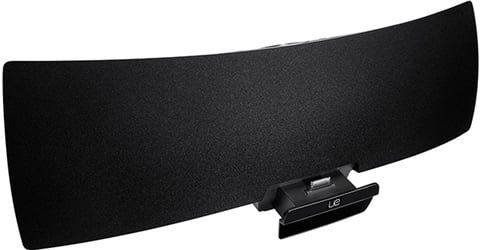
Available from Cex for a bargain £10 – it's just connected to our home wifi network via Airplay. The sound quality is very good (and the iPod port closes neatly away).
My M1 macbook pro spends most of it's life on mains power, and is now 3 years old with a battery capacity of 91%, so is looking on average 3% per-year. I've previously had Dell's and thinkpads, all of which had replacement batteries by this age, so this is something apple seem to have got right.
I think that leaving it off mains power when not in use may actually be worse, since it doesn't truly go to sleep when idle even with the lid shut, and still does background things. Leave it unplugged for a weekend and I see the charge can have dropped by a fair bit, so would probably cause more battery wear through additional charging.
I was a big fan of the 27" iMac (had 4 for work, just retired the penultimate one this week - replaced with a Mini & 30" LG monitor from CostCo which was very cheap!!) as it was cracking VFM - you basically got a massive, awesome display for free. The new iMacs don't make sense for me, smaller monitor, poor VFM vs a Mini or woeful performance vs Studio. Plus decent monitors from Dell, Samsung, LG have got a lot cheaper over the last few years.
My m1 MacBook Pro (14”) is also 3 years old and spends most of that plugged in. Battery health 88% - it’s enough to still just about manage a full day of work out and about without needing to plug it in.
At home I leave the lid shut and have 2x 27” 4k monitors, an apple bluetooth keyboard and a Logitech mx master mouse. The only thing I don’t like is the speakers sound weird with the lid shut. So I generally wear headphones.
Using a M1 air here. For certain task really need 2 proper screens so use the workaround with display adaptor and a hub. Hooked upto a 32 and 24 inch screens. For a while I used the laptop keyboard and trackpad but now have Logitech mouse and keyboard which are amazing.
I have a lot of data analysis software and patient data which has to be run on the hospital network so I can either use the issued device which is really flaky offsite or I can remote into a VDI and then use this or just take over my desktop onsite. I travel a reasonable amount so having the battery and small size of the MacBook is ideal and also the speed of booting up helps.
dont mind the pink curtains. Used to be my daughters bedroom!

M1 Macbook Pro here. Used Macbooks best part of a decade now, dual monitors, plugged into charger 24/7, MX Master mouse, and clicky keyboard for maximum fun.
The only thing I don’t like is the speakers sound weird with the lid shut. So I generally wear headphones.
The microphone doesn't work well either. Lid open for zoom calls, or external mic required.
If the resolution looks a bit funky Better Display should sort it. On my original monitor I had to use it to enable HiDPI or something similar to get it looking right.
I changed the monitor soon after for a 4K one, cheap off eBay, and the picture is much better.
OP: hope you don’t mind me jumping in this but I have a not dissimilar query…
For some reason the Display Monitor has taken my fancy (but not the cost, £1.5k!) so some little internet digging and the BenQ monitors seem to have a decent rep/rec on various places.
Looking at 27” only. The 32” have better features (but cost more £400!) and I guess I’m just looking at personal/casual use for MacBook but potential for hooking up work (ThinkPad P53) when I get back into Revit/etc… Plus, you know the whole size thing dominating a space…
There are 2 likely options (allegedly designed/aimed at MacBook users?) the PD27225U (@£699) or the (new) MA270U (@£450). They seem to have a minihub capability (and charging via monitor?) which would be useful. Not fussed about multiple screens (I use my laptop screen as 2nd monitor at work for outlook, etc.). Looks like they might allow hook up of my ipad (for Netflix perhaps?).
That they have windows compatibility, adjustability (and a non-fixed cable) as well as significantly cheaper it would make better sense than the Apple Display monitor….
Anyone experience of the BenQ’s? I’m only really planning to do this once so rather get it right than buyers regret 🙂
Any thoughts?
Go for it @metalheart. My Dell screen and Logitech MX mouse and keyboard arrive Monday, so I am hopefully sorted 🙂
I have a BenQ monitor in my setup, its a pain in the arse. There is some quirk surrounding Apple silicone and BenQ monitors although it might have been fixed with the newer chips. Mine has a problem with flickering when the dekstop is run in "dark mode" and on some websites with dark backgrounds and video overlays. It's taken a lot of messing around with settings to get the flickering to a minimum but it does still appear from time to time.
The other Mac Mini in the house has a Philips 32" 4K monitor attached to it, no problems at all.
@metalheart I recently bought myself a new Dell screen that would probably fit your requirements. 27”/ 4k (the sweet spot I think). Has 90W power delivery over usb-c (enough to actually charge the MacBook Pro up rather than just keep it charged). Various usb (a and c) ports so peripherals can be attached to the screen. Plus an Ethernet port (though I don’t think you’ll get gigabit Ethernet if using the usb c link for video).
@metalheart The Dell U2723QE that I link to at the top of this page, and @bassmandan recommends above would be my pick over anything from BenQ. Very much recommended.
I really would like a bigger keyboard than the iMac one, but I use the touch key all the time for passwords, etc. I don't think any of the non apple ones support that? Happy to be told differently!
M2 Macbook Pro + 2 x 27" Monitors (1 into HDMI, one through a USB c to HDMI adapter)
Logitech Wireless Keyboard & Mouse.
I'd love a single 49" wide screen USB C monitor though - I think that would be the optimum.
I really would like a bigger keyboard than the iMac one, but I use the touch key all the time for passwords, etc. I don’t think any of the non apple ones support that? Happy to be told differently!
there's always the Magic Keyboard with TouchID - I have it & really like it, it is £££ tho!
@metalheart - and to confirm, as it somewhat surprised me when I first used the USB-C to charge my iPad, the Dell U2723QE will mirror the iPad display.
Twin Studio Displays which work with Dell work laptop and my own MBP.
[url= https://live.staticflickr.com/65535/54098261439_7fac1cff20_z.jp g" target="_blank">https://live.staticflickr.com/65535/54098261439_7fac1cff20_z.jp g"/> [/img][/url][url= https://flic.kr/p/2qqtJnv ]Home Office[/url] by [url= https://www.flickr.com/photos/brf/ ]Ben Freeman[/url], on Flickr
I use this 32" Lenovo IPS USB-C 4k monitor. £400 atm but it comes down to £299 occasionally so would keep an eye out around black Friday. It's not as good a spec as the Dell (lower contrast, fewer ports and no USB-C ones), but it is bigger and cheaper, and for office use, for the money, it's great.
M2 Mac mini with a huge ultra wide monitor in my home office and a MacBook Air for the actual office. Corporate laptop gets booted up every few months to get its updates and that’s about it.
hoping I don’t end up working for anyone who insists I use a corporate device again anytime soon
Thanks for all your responses.
I have a bit of negativity re. Dell (I bought a laptop that had a great spec but a shit screen… that i ended up getting a MacBook to replace it…) but it does feature in most the monitor for macs reviews I’ve been reading. The reviews do flag brighter around screen edge issues, is that just reviewers being ultra fussy or an actual ‘thing’? Not overly keen on the silver finish but not a dealbreaker.
I was looking at inbuilt speakers (as per the Studio Display) as not sure how MacBook would sound in clamshell mode…
I was going to wait to see if any Black Friday deals show up anything…
God, this is annoying!
The reviews do flag brighter around screen edge issues, is that just reviewers being ultra fussy or an actual ‘thing’?
I've not noticed any issues, and think the Dell looks pretty good, but I take the view that all sub £1000 displays are going to be poor compared to Apple built-in displays so don't expect the earth.
I was looking at inbuilt speakers (as per the Studio Display) as not sure how MacBook would sound in clamshell mode…
I solve that with a pair of HomePods on the desk 🙂
I was looking at inbuilt speakers (as per the Studio Display) as not sure how MacBook would sound in clamshell mode…
Studio Display speakers are very impressive, as you'd expect from Apple.
Yeah, I get that any (cheaper!) non apple display is going to be ‘inferior’ sound wise but in truth it just needs to be as good as (but preferably better than) an iPad/MacBook Pro but that’s the ‘cost’ of not Paying the Apple tax 🙂
But the adding the likes of the Studio all in one job is what took my fancy. The cost, lack of adjustability (and would it work with my work laptop) is what has stopped me… this is what drew me to the BenQ… (but the reviews say the speakers are a bit shit…). I don’t want more shit taking up space so don’t want to also add speakers to the mix (Plus aren’t they bluetooth, my existing (Anker) bluetooths have horrendous drag if watching Netflix or YT).
Footflaps, does the Studios work with your windows work machine easy enough?
Just to cause your skin to crawl, here’s the space display likely its to be Put… the box reps the space And as you can see, there’s shit aplenty here already 🙂
https://www.flickr.com/photos/sofaboytt/54113507436/
I feel very stressed at that. Haha
The studio screen looks great but I could buy about 4 Bose speakers with the difference! (And was one of the reasons I did originally order a iMac compared to the cost of a studio screen).
My Samsung ultra wide has decent built in speakers. Until you play the Radio 3 through the Rogers hifi monitors. Perfectly acceptable for teams/zoom, and background music, but a nice hifi is a class above, and no it’s not played loud. That’s not the point of infidelity. One day I’ll go full LA3/5a but not just yet.
Do Samsung still make the Apple screens? I would not go back to a docking station and power pack again. That one USB-C cable to charge and take video and sound has been a revelation. My old MBP still has three cables (MagSafe, hdmi and optical 3.5 jack), but I don’t carry it anywhere.
So, the quest for a Studio Display alternative has come up short as there doesn’t seem to be a realistic direct ‘one to rule the all’ option. The Apple Studio Display I’d actually want to go for is £2,149, so, err, nope!
The BenQ stuff gets a bit if a slating for sound quality so decided not to Pursue that option… which kind puts the Dell into the running but requires some form of speaker Provision.
I’ve found bluetooth too laggy so what is the recommendations for a wired solution (as Previous, just has to be ‘as good as’ the MacBook) for sensible money?
And is it connected vis the 3.5mm jack?
As I mentioned previously - I use a pair of OG Homepods for my audio, but given "as good as the Macbook" is your benchmark, then a single Homepod Mini should do the trick. Airplay not Bluetooth, and I have no lag issues.
Audio Interface and then active speakers of choice.
So having come to a similar decision (screen has arrived this morning!) and deciding I really didn’t want two bookshelf speakers cluttering up my relatively small desk, I have ordered a B&O Beosound A1, which gets great reviews on sound quality for a small speaker, and in the depth of the instructions says can be used as a conference call speaker (also has a mic) connected by USB-C. It should arrive later this week so I can let you know.
@timmys: couple of issues with HomePods; 1 arent they Siri voice activated? I’d rather not have that (can it be disabled?) 2. How would that work with my work (non apple) set up? Bluetooth (or would it even connect?). And when you say OG, are the latest ones any different? Are they ‘always on’? I would prefer a wired solution though…
@oldtennisshoes: that sounds complicated (and I know absolutely nothing about active speakers so have no ‘choice’). I’m after simple, decent enough quality and not very expensive. In my head that’s a set of ‘Plug-ins’ when needed probably used for occasional Netflix or watching films. Rest of the time I’m assuming onboard MacBook will suffice (i.e. no need to clamshell it).
@ahsat: let me know how it goes and if lag is an issue connected via bluetooth (and whether Alexa enabled is likely to be a pain 🙂 ).
As per the CD player thread I don’t want to get into voice activated as I don’t find these things Play nice with my (assumed) Nd wired brain and so liable to get hurled across the kitchen in a fit pique…
couple of issues with HomePods; 1 arent they Siri voice activated? I’d rather not have that (can it be disabled?) 2. How would that work with my work (non apple) set up? Bluetooth (or would it even connect?). And when you say OG, are the latest ones any different? Are they ‘always on’? I would prefer a wired solution though…
Sounds like a Homepod probably isn't the best solution. Yes, you can set them to stop listening for "Siri...", but no they are not going to work for anything non-Apple. Off topic, but it looks as though your computer is in your kitchen, the thing I Siri for most often is to add things to the shopping list while I'm cooking..."Siri add X to the shopping list" and X appears on everyone's phones via the family sync'ed shopping list in Notes.
Wired will probably be best for you. The Dell monitor has an audio out jack so you can wire the speakers to the monitor and have the audio carried via the USB-C cable from whatever is connected. Even without speakers attached the monitor shows up as an audio-out device on my computers.
I managed to wait till the end of the day, so haven't used in significant anger yet, but that was super easy to set up! The Dell and Logitech units suggested above. Much, much better screen quality than my 2020 purchased unit and the USB-C hub plays very nicely with the MacBook so I don't have to faff with changing settings and is super sharp. Really like the MX keys - really nice feel and much smaller desk estate than our old keyboard. Mouse also seems very slick and quiet, but I haven't tried to play with any of the settings yet - literally plug and play. MacBook has also picked up my existing Logitech webcam in Teams with no issues, again plugged into the screen hub. I know I am saying a lot of things a lot of you know, and very kindly explained to me - just thought worth writing out my immediate experience for likes of MetalHeart or others in similar position who might find this down the line. Really liking the lack of cables for my slightly OCD/nerodiverse brain 🙂

Nice and clean! I like that…
Glad it all ‘just works’ gives me hope (but need a black bag to get that pristine 😀 )
@ahsat Glad you like it. Looks a lot like like my setup, even down to the AirPods case sitting on the monitor foot!
One tip of the keyboard/mouse. They both have buttons with 1/2/3 on them to allow store settings for different computers (easy-switch buttons). When switching between MacOS and Windows it's worth using those so you can have different settings for both as otherwise the key mapping is slightly off. There is a key combo to tell it whether you are connecting to Mac/Windows;
fn+P: Mac layout
fn+U: Win layout.
Hold down 3sec until the led on easy-switch buttons light up.
Looks great. I added a wireless charging pad stuck on the monitor stand and powered by the monitor usb hub. It would be nice to have one built in. All our work desks now have built in wireless charging pads. They’re fabulous. Phone is always charged now! Still use wired for EarPods as I’ve found the AirPods lose battery and sometimes don’t play nice.
One tip of the keyboard/mouse.
My Logitech mouse came with a tiny USB wireless dongle. Plug that into the monitor USB slots and it’ll work with whatever laptop you connect, no need to flick the fiddly switch under the mouse.