 You don't need to be an 'investor' to invest in Singletrack: 6 days left: 95% of target - Find out more
Warning, complete technonumpty alert needed.
Would some kind soul like to tell me in words my nan would understand if/how I can add OSM maps to my newly aquired Android phone? Google maps isn't really what I want.
I have OSM on a SD card in my Garmin so I assume that I could do the same with the phone but how?
Main aim is more detail, eg contours etc than Google maps and also something that won't use and data allowance.
Ta in advance
Get yourself an OS Maps subscription and download the OS Maps app?
edit: maps can be downloaded when you're on WiFi, so then doesn't use data
Easiest solution is some form of mapping app. There are countless out there. I have used Alpine Quest for about 10 years now. Very happy with it. Was about £5 for lifetime subscription but you can use it for free with limited features to try before buy. Will do all sorts of maps both online and offline. I have a complete set of older UK 1:25K maps (.qct format) on my SD card which I can use offline anywhere. Does loads of other stuff, like letting you superimpose Strava heatmaps over the OS maps. I would (literally) be lost without it lol.
Get yourself an OS Maps subscription and download the OS Maps app?
Is the answer. Memory Maps is also a good alternative, they often have deals on lifetime maps downloads.
Ta, but how?
Lets be basic. An app is a programme I down load . Yes?
Now where would one come from?
Told you I was a techno numpty.
This is a person who makes 10 quids worth of PAYG last nearly 3 years. And most of that was in error. I don't make a call or send a text for months and when I do it's "why are you not outside M&S as we agreed".
What confuses me is how I get the app to look at the maps I need. The Garmin just found the SD card and uses those maps. As that was set up probably 10 years ago I have no idea what buttons were pressed.
Wífi won't be any good in the woods.
Non paying Strava purely as it is easier than noting mileage on a calender which is what I did for decades.
Has be be non subscription apart from small one off of free as OSM was.
Have a look here. There are links to download to your phone too (even if you use a pc it will download to your phone)
You can also buy the paper OS map which will come with a code you scratch off and then download on the OS app.
( which you will find in Play Store)
Ah, forgot about the OS download but that only applies on new maps. Good shout though. No idea how to use it. Ta
This is a person who makes 10 quids worth of PAYG last nearly 3 years. And most of that was in error. I don’t make a call or send a text for months and when I do it’s “why are you not outside M&S as we agreed”.
your life may well be enriched by embracing a more modern approach and being prepared to spend a little.
It sounds like you need / want Ordnance Survey maps on your phone? So that means paying someone to get them. OS Maps would be the logical place. About £25 a year for a subsription. You would have to go to the Android App store and download the OS Maps app.
Once you have that you could then download offline maps to your phone using wifi.
If you cant work out how to do all that, you need to google !
Has be be non subscription apart from small one off of free as OSM was.
That doesnt really exist. I assume by Garmin you had a Garmin device? In essence you paid for the subscription to the mapping by paying for the device, but I imagine that was a one off map which will now be way out of date.
look at it this way, you are no longer having to pay for the device, just a subsription. Whether that is better is debatable but thats how the world is now
Locus Maps.
Loads of different maps to choose from (I use OpenTopoMap General). It's free and the maps for the continent are good.
You can download as many maps/areas for offline use as you want.
Navigation, either biking, hiking or driving is good.
Navigation
I use Maverick on Android and select OS Explorer from the map types - it is free
Now where would one come from?
There's a tile on the phone screen called Play or Play Store (I forget in Android) tap that. Look for the Q (search bar) and type in OS maps...
Is that the sort of basic info you're looking for?
Welshfarmer, sorted . ta.
Didn't want OS maps but something like OSM. (not the same by a long way)
I accept that the Garmins I use both may have some form of software reader built in which is what I wanted to read the maps I have.
Ta all anyway
https://play.google.com/store/apps/details?id=com.orux.oruxmapsDonate&hl=en_GB&gl=US
This can view maps saved on your phone in Garmin format offline I think, such as the OSM maps.
That doesnt really exist. I assume by Garmin you had a Garmin device? In essence you paid for the subscription to the mapping by paying for the device, but I imagine that was a one off map which will now be way out of date.
I think Garmin now use OSM (Open Street Map) an opensource map which is free.
If you install https://www.garmin.com/en-GB/software/express/windows/ and plug your Garmin into your computer it will update it to the latest maps.
What is the map to be used for?
I increasingly use CycleStreets - as well as good maps it has turn by turn navigation on the bike and is relatively easy to whack in a route and go. It is NOT for sharing on social meedja and all the crap that Komoot has. It is not so good offroad, but onroad it is great.
I find for hill walks the (free!) Walkhighlands app is ace - just sign up to free account and predownload any route on wifi.
Short of that, OS Maps subscription.
I find for hill walks the (free!) Walkhighlands app is ace – just sign up to free account and predownload any route on wifi.
And don't ignore the Funding pleas from Walkhighlands if you want to continue using it.
An app is a programme I down load . Yes?
Now where would one come from?
Yes, and they come from the Google Play store on Android, and nowhere else (with a few exceptions you don't need to know about). This gives you some security and reassurance since it's a vetted programme.
You need to locate the Google Play Store app on your phone.

i use mappy.cz for openstreetmap. fast, can download maps offline, works well. free
If you install outdoor active you can download the areas of OSM you want when connected to Wi-Fi and use them without a data connection on the hill.
There is an osm app that you can use to download maps for offline user
https://play.google.com/store/apps/details?id=net.osmand
Backcountry Navigator is a one off fee to have as much OS Mapping as you like at any of the available scales.
OSMAnd+ is a freebie with paid for option if youd prefer OSM maps. Absolute doddle to pick the areas you want. Will also act as a turn-by-turn satnav if that's what you want.
Both will store the maps on your device so you dont need wifi/mobile data away from home if you plan ahead.
I use the OS Maps sub and app on phone option. It gives you access to 1:50k (Landranger) and 1:25k (Explorer/Outdoor Leisure).
- Go to osmaps and buy an annual sub (£29). You will need to set up an account. https://shop.ordnancesurvey.co.uk/os-maps-12-months-recurring-subscription/
- Go to Google play on your android phone and download the app
- Open it and log in with your OS maps account set up when buying the sub
- Use app
This gives the ability to download apps and routes but only to one device at a time.
So that's how.
It works very well for me. Downsides - phones aren't always waterproof and when it is really persisting down you might be very grateful for your fellow rider with a proper waterproof GPS on their bars or a waterproof touch sensitive case.
The other good thing about it is I can log in on my PC and use a browser to plan a route on a big screen/print extracts and it's all saved there in my OS account and available in the app.
Downloading and planning routes in the app is pretty intuitive.
Would some kind soul like to tell me in words my nan would understand if/how I can add OSM maps to my newly aquired Android phone? Google maps isn’t really what I want.
On my phone I download mapping from maps.me -- it's free and it's supplied as vector data -- so basically very 'light' in terms of data download and also storage.
I have used it all over the world, on an Android phone.
It uses the phone's GPS to locate where you are, and this works without an internet connection, so offgrid is no problem.
The mapping is detailed depending on the Open Street Map (OSM) for the area you're in, which because it is crowdsourced can be in some places more patchy.
It is fine for GB and most of Europe!
You can import GPX routes and get the app to plot them out on the map or instead plot routes in the app itself.
OSM does not have contour information, but plotting routes will give a gradient profile.
Give it a whirl, I like it 🙂
can't seem to load images at the mo.
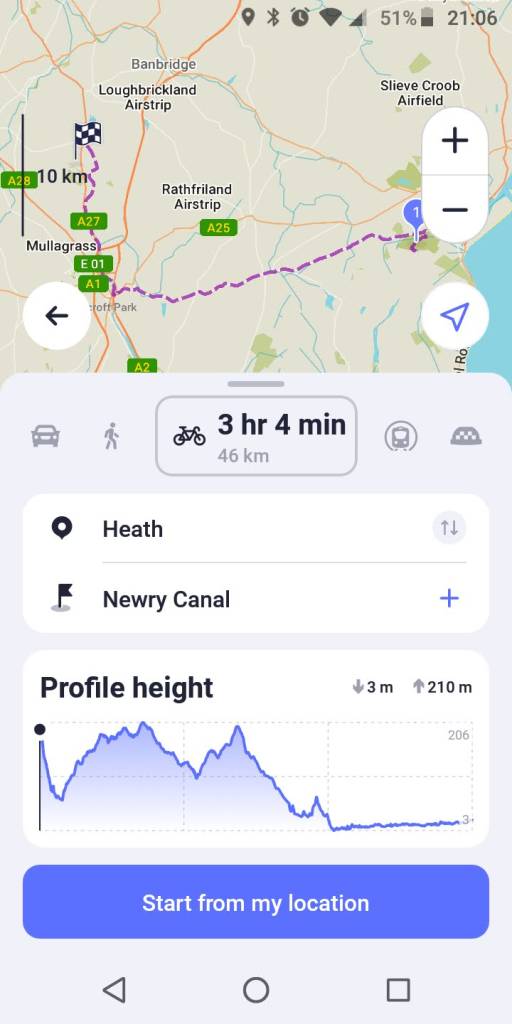
pictures are back!
another example for inf of maps.me
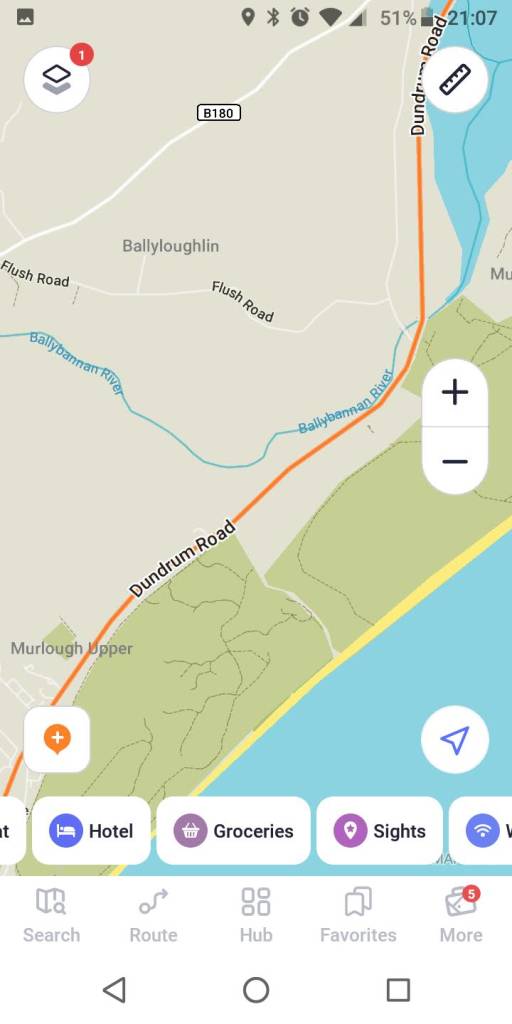
+1 OSMAnd
A bit overwhelming with features at first but does a lot. However contours are a paid feature.
Offline mode and has cycle maps and can get overlays of cycle routes / trails.
There are several versions, OSMAnd (free), OSMAnd+ and OSMAnd Pro and subscription involved for some things.
https://osmand.net/docs/user/purchases/
You can also buy the paper OS map which will come with a code you scratch off and then download on the OS app.
( which you will find in Play Store)
This is what I do. After paying multiple times for UK wide mapping over the last 20 years on apps that became redundant I realised that I only actually need mapping for the places I go. And that however good the online mapping theres no substitute for laying out a big map on the floor.
So I now have 1:25 paper maps and download the offline mapping for them in the OS app. The Sub is £28 a year and paper maps only £6 each from https://dash4it.co.uk/catalog/category/view/s/os-explorer-maps/id/46/
the only issues I've had are -
1) sometimes the app throws a fit and says theres no data (I've got the maps offline you *&**(
2) updates mean you sometimes have to log back in, which you can't do if theres no data.
3) updates to operating system on the iPhone mean it dumps the offline maps so check before you go away, not in the middle of a ride
the only issues I’ve had are –
Pretty big ones for a paid for service with an annual subscription! 🤣
Pretty big ones for a paid for service with an annual subscription!
You've missed the point - I'm not paying for an annual subscription. The app is free and you get lifetime downloads of an area with a one off £6 for each paper map. And to be honest, a lot of those same issues happen with every other app on my phone. app updates and needs you to log in again, offline files get cleared automatically to save space. The issue with the OS app that's different to most others is that I'm sometimes in the middle of nowhere when I discover it.
Perhaps not, but you did mention a subscription and you've had to pay for the paper maps at the very least.
Backcountry Navigator cost me £12 in 2015 and I've installed on four phones now (I think). Thats given me all of the UK at all scales and it hasn't ever left me stranded, it also offers maps from the world over.
The issue with the OS app that’s different to most others is that I’m sometimes in the middle of nowhere when I discover it.
A variation of damning with faint praise?
In fairness I haven't used the OS app in years but it was always frustratingly behind the curve beyond having the actual map quality in its favour. Has "snap to path/bridleway" etc been implemented?