You don't need to be an 'investor' to invest in Singletrack: 6 days left: 95% of target - Find out more
I recently bought a Garmin edge 530 and have been trying to make my own routes to follow. I have been using memory map on a laptop to make a route (or track) to upload to my GPS.
The problem is that the GPS keeps telling me that I am 'off route' or that I need to 'turn back'. Basically, my route plotting on memory map isn't 100% accurate, so the GPS thinks I am off route, despite the fact that the pre-plotted course/route might be 5-10metres to one side, the GPS keeps making noises and saying to do a 180..
That is ok when I am following a route in my local area, so I know that it is just a glitch.
Is there any way to plot a route/course to avoid this (without spending hours on memory map adding waypoints every 50 metres?!
I dunno.
I've had a 530 for years (got one within about a week of them being released) and I have the same problem (periodically) no matter what software I've used to create the course or how careful I've been creating the course or even if I'm following a previously ridden route from Strava.
I've just put this down to the 530 being a bit "slow" (as in the processor is not powerful enough) but I could be wrong. It seems to take an awful long time to re-calculate routes when you do drift off route, or when you turn at a junction, then it sometimes takes a long time to "catch up", for instance.
So, I'm interested in any solution but I can't help you!
A couple of suggestions. First, turn off the automatic route recalculation - if you go off course that will try to take you back to the point you first diverged, hence the U turn instructions. Second, try using Garmin Connect to draw your route as that will allow you to follow tracks from the global heat map which are probably more representative of where the trail goes than the lines on OS maps.
Eta - on the 830 the recalculation option is buried under Menu/activity profiles /<name>/Navigation /Routing /Recalculation - set it to off. You'll still get told that you're off course but no instructions to turn back.
I plot routes in onTheGoMaps. It has most paths on it and automatically snaps to follow the path. Very easy to use online, without log in. It can be nice to have an OS map open too, to check as you go. Save it as a gpx then open with Garmin.
OS maps online now has snap to trail as does Strava
I have been using memory map on a laptop to make a route (or track) to upload to my GPS.
Use a route planner like Strava or Garmin Connect. The problem with a mapping app like MM is that some of the trails, especially off-road can easily be a few metres away from the actual conditions on the ground. Things change, trails erode, line choices move and maps simply can't keep up.
Something that has a user-generated heatmap of where the trail actually is will be more accurate. Personally I much prefer Strava, Garmin's route creation software is clunky.
And as mentioned above, turn off auto-recalculation. You can set it to auto, ask before re-routing or do not reroute.
RideWithGPS also worth a mention, there's an app on Garmin Connect which syncs up nicely.
I think all the navigation devices do this to a greater or lesser extent. I tried a Hammerhead Karoo a couple of years back and it had a absolute shit-fit as I was riding a path that was a couple of meters to the side of the road that it [desperately] wanted to be on...My Garmin does the same as yours (an 830, although I think they all have the same basic programming), and often says "Make a U-turn" followed by "Route found" a couple of meters later when it finds where it is again. You can turn off automatic route re-calculation, but all that does is create an on-screen prompt (a tick) to allow it to re-calculate, and then all it says is "Make a U-turn". It wouldn't be as bad if it said anything else, like "you're to the right of the route", or "The route is 20m to the left" but "make a u turn" is perhaps the most pointless and unhelpful instruction you could conjure up.
It's compounded by sometimes the actual route instruction is "Make a U-turn" so you've sometimes no idea if its just lost, giving you an instruction or just having a bad day...
The only reliable way I've found to deal with it, is to just have a good idea of where you're actually going, don't just rely on the Garmin 100%, have a look at the map the day/evening before and have a close look at points where it may throw you a curve ball. TBH I think most nav. devices need an setting that says the equivalent of "Yes, I know, leave me alone"
If you are using Memory Map then you are probably using the Ordnance Survey maps. There will be slight variations between that and the map on your Garmin, which is based on Openstreetmap (OSM). If you plan using something based on OSM then the variances will mostly disappear. Garmin route creation on Connect, Komoot, RWGPS and, I think, Strava/Fatmap, should all be fine.
FWIW I use Connect or Komoot for my route planning and never few issues with my Edge 530. One tip would be to place a routing point immediately after each junction, that way you won't keep getting direct back to a previous one.
I know it's no help but the best experiences I had navigating were with ancient E-Trex gps that didn't give turn-by- turn instructions.
I used to have two data fields at the bottom
- an arrow (which would be pointing towards the next point on the route)
- 'distance from route'
You basically followed the line on the display. The combination of GPS accuracy and plotting accuracy (and the fact that the route you're following is actually lots of straight lines and not a curve) meant 10/20/30m off route isn't likely to be a problem.
but “make a u turn” is perhaps the most pointless and unhelpful instruction you could conjure up.It’s compounded by sometimes the actual route instruction is “Make a U-turn” so you’ve sometimes no idea if its just lost, giving you an instruction or just having a bad day…
This! ^^
One of the most profoundly annoying "features" of Garmin navigation.
Quite often "make a U-turn" should actually be "there's a tight hairpin bend to the left/right ahead".
Not done something silly like set the Garmin to OS/British grid format, but left the datum as WGS84 instead of making that OS too?
Personally, I set mine to WGS84 and normal degrees etc.
I just put route points at junctions and a few along a path if it goes round a bend. Certainly not every 50m. Max 250 points for an entire day's ride / hike, and usually much less than that. I don't get rerouting alerts, but just get a beep every time I go close to a route point as a confirmation that I'm on route still, or that I might need to check which way at a junction.
I believe OS are using open street map as well as everyone else
quote from os website
“Why does my route not always follow rights of way, or paths shown on the map?
Some routes are created by Global Snap to Path, using data from OpenStreetMap, which comes from a variety of sources. Ordnance Survey does not verify this dataset, therefore we cannot make any guarantees about its accuracy”
I just put route points at junctions and a few along a path if it goes round a bend. Certainly not every 50m. Max 250 points for an entire day’s ride / hike, and usually much less than that. I don’t get rerouting alerts, but just get a beep every time I go close to a route point as a confirmation that I’m on route still, or that I might need to check which way at a junction.
I can get an all day route with just a handful of route points, all bends included.
Max 250 points for an entire day’s ride / hike, and usually much less than that.
Yeah, I'm not putting in that many waymarkers on any route. It should be blindingly obvious to folks like Garmin (and TBH on-line planners like Komoot as well) that if I place a waypoint at say mile one and the next waypoint at mile two on the same track, and that if the track IRL deviates slightly from the one in the server, that I don't need to be told to "make a U turn" if I'm headed in the right direction.
I believe OS are using open street map as well as everyone else
I don't think the OS maps in Memory Map support this though?
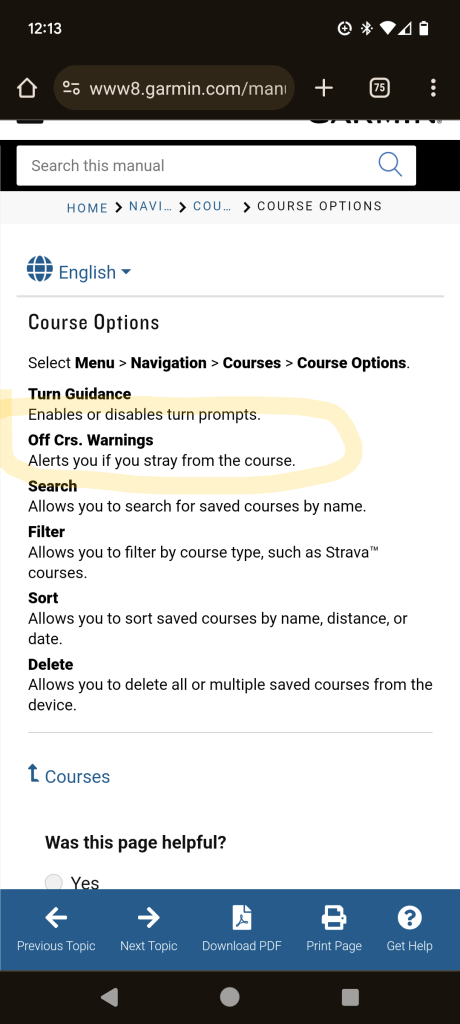
Does anyone know what these settings actually do? (i.e. which one stops the infernal "make a U turn" message go away on a 530?)